> For the complete documentation index, see [llms.txt](https://wiki.openelab.io/llms.txt). Markdown versions of documentation pages are available by appending `.md` to page URLs; this page is available as [Markdown](https://wiki.openelab.io/robotics/elephant-robotics/myagv-2023-pi.md). Agents can also search and read this documentation through its [MCP server](https://wiki.openelab.io/~gitbook/mcp).
# Elephant Robotics myAGV2023 Pi: power, paired firmware and ROS 1 navigation
Commission the 2023 Pi 4B myAGV with 3.3 V/12 V interface limits, matched image/SDK/firmware, stationary telemetry and reproducible Noetic mapping/navigation.
{% hint style="info" %}
[**Elephant Robotics myAGV2023 Pi on OpenELAB — SKU MyAGV-2023-PI**](https://openelab.io/products/elephant-robotics-myagv-rpi-robot-kit-mapping-autonomous-navigation?variant=44585065545926)
{% endhint %}
## Product overview
This guide covers the **2023 Raspberry Pi 4B myAGV**, not myAGV Jetson, Plus, Pro or a myCobot arm bundle. The workbook/original German product uses `MyAGV-2023-PI`; the current IO catalog spells it `MyAGV-2023-Pi`. The exact2023 Pi model, handle and variant resolve that capitalization difference. [Original store reference](https://openelab.de/products/elephant-robotics-myagv-rpi-roboter),[current IO product](https://openelab.io/products/elephant-robotics-myagv-rpi-robot-kit-mapping-autonomous-navigation),[official model manual](https://docs.elephantrobotics.com/docs/myagv_pi23_en/).
myAGV2023 Pi is a Mecanum mobile base with an integrated Pi, LiDAR, camera and lower-level motion controller. Start with the supplied Ubuntu 20.04 image and its matched firmware/SDK. Its documented mapping lane is **ROS 1 Noetic**. A generic desktop icon for ROS 2 does not establish compatible ROS 2 drivers for this exact2023 image.
## Applications
Use the platform for omnidirectional driving, Python/Blockly control, LiDAR SLAM, waypoint navigation and optional mobile-manipulation integration. Begin with stationary version/status reads, then short floor moves and a small named map. A robot arm, extra battery, 7-inch display, pump or depth camera is an accessory unless explicitly supplied in the ordered kit.
Payload and speed must be considered together with stopping distance, center of gravity and floor traction. A top-mounted arm changes the base's footprint and stability; the 5 kg published base payload does not qualify every raised-arm configuration. Use the official mounting drawings and a separate integrated-system check before carrying an arm or other load.
## Specifications
| Item | Official2023 Pi reference |
| ------------------------- | ------------------------------------------------------------------------------------------ |
| Main host | Raspberry Pi 4B; BCM2711, quad-core64-bit1.5 GHz; 4 GB RAM |
| Drive | Four planetary brushless DC motors; Mecanum wheels |
| Payload / base mass | 5 kg /4.16 kg manufacturer references |
| Maximum speed | 0.9m/s reference; not a first-test speed |
| LiDAR | 360°; 0.12–8m stated range |
| Built-in camera | 5MP; 65° viewing angle; RGB, not native depth |
| Supply/charging reference | 12.6 V 2 A factory adapter; marked DC input |
| Arm auxiliary output | 12 V 5 A; XT30UPB-F connection; not a second charging input |
| GPIO | 3.3 V logic; 2.54 mm header; use actual labeled signals |
| Interfaces | Two exposed USB ports, HDMI, Ethernet, GPIO, auxiliary arm/pump/backup-battery connections |
| Temperature | −5 to 45 °C |
| Runtime references | 181min operation /328min standby in manufacturer conditions; not independently measured |
[Machine specifications](https://docs.elephantrobotics.com/docs/myagv_pi23_en/2-ProductFeature/2.1-MachineSpecification.html),[host](https://docs.elephantrobotics.com/docs/myagv_pi23_en/2-ProductFeature/2.2-ControlCoreParameter.html),[electrical interfaces](https://docs.elephantrobotics.com/docs/myagv_pi23_en/2-ProductFeature/2.4-ElectricalCharacteristicParameter.html).
The official2D drawing shows a 230 mm width, 331.15 mm base length and 340.87 mm overall length in the illustrated display configuration. It marks153 mm body/LiDAR height and 199.11 mm with the illustrated display. These are different envelope references; do not combine them into one unexplained size. The drawing is A-00, dated2023-08-16, distributed in the 240401 PDF. [Direct dimensioned drawing](https://download.elephantrobotics.com/Product_3d_files/myAGV2023/AGV2023_2d_240401.pdf).
## Hardware and connections
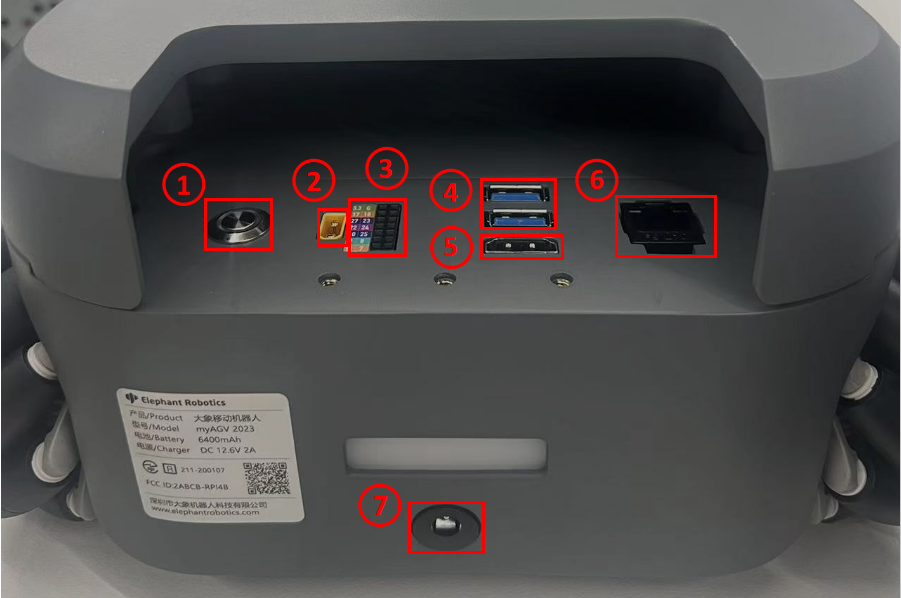
Official Elephant Robotics port photograph, visually inspected. Callouts are 1 switch, 2 auxiliary arm power, 3 GPIO/DC header, 4 USB, 5 HDMI, 6 Ethernet and 7 DC input. The pictured chassis label identifies a 12.6 V 2 A charger and 6400 mAh battery reference; confirm the delivered pack label before replacing it. Do not infer a GPIO pin number from a photograph callout.
### Power and logic boundaries
Use the marked DC input and supplied adapter for charging. The auxiliary XT30 arm output is rated 12 V 5 A in the manual; it is not a generic 5 V peripheral supply and must not backfeed the base. The GPIO header is 3.3 V logic and includes a 3.3 V supply/GND. Never connect12 V, an arm supply or a motor directly to it. Use a suitable interface/driver for external loads; the manual's approximate GPIO-current discussion is not a recommended motor/relay drive rating.
The detailed header table identifiesGPIO17, 27, 22, 10, 9, 11, 18, 23, 24, 25, 8, 7 plus3.3 V/GND. A summary table repeatsGPIO10 where the detailed table givesGPIO18; use the detailed labeled drawing and actual board silkscreen before wiring. GPIO alternate functions can make a signal unavailable while a peripheral owns it. No new pin allocation is assumed here. [Electrical table and header](https://docs.elephantrobotics.com/docs/myagv_pi23_en/2-ProductFeature/2.4-ElectricalCharacteristicParameter.html).
Keep the factory lower-controller UART connection unchanged. On the 2023 Pi image, the documented Python serial port is **`/dev/ttyAMA2` at 115200bit/s**. This differs from a Jetson USB serial path. Close AGV\_UI, myBlockly, ROS base nodes and other serial applications before direct SDK access. A backup battery or pump uses its dedicated connection; do not parallel a replacement pack through GPIO or an improvised Y-cable.
## Software and development resources
### Match the complete image–firmware–SDK set
| Official Pi image | Firmware | Associated software/reference |
| ----------------------- | -------- | ------------------------------------------------------------------------------- |
| 20240103 Ubuntu 20.04 | v1.0 | Earlier delivered environment |
| v1.0.25.04.22, 20250422 | v1.1 | pymycobot3.8.0; ROS tag `v1.1.0-pi`; LiDAR autostart, IMU/odometry improvements |
| v1.2.25.08.15, 20250815 | v1.2 | pymycobot4.0.0; ROS tag `v1.2.0-pi`; myStudio3.6.4 |
[Official image/release table](https://docs.elephantrobotics.com/docs/myagv_pi23_en/8-FilesDownload/8.4-SystemInformation/8.4.1-System_Image.html). The generic firmware note page lists only older versions; the image table provides the later v1.2 pairing. Do not upgrade one component blindly because a generic Python lesson says `pip install --upgrade`.
Record before changing anything:
```bash
cat /etc/version
cat /etc/version_log
cat /etc/os-release
python3 -m pip show pymycobot
printenv ROS_DISTRO
ls -l /dev/ttyAMA2
```
The original example below follows the **v1.2 image/pymycobot4.0.0** source. Its `get_mcu_info()` returns expanded telemetry; the public API page's older three-item battery-list description is stale for this implementation. Keep raw replies until a schema is matched to firmware rather than labeling arbitrary list positions as voltage. [Reviewed4.0.0 implementation](https://github.com/elephantrobotics/pymycobot/blob/v4.0.0/pymycobot/myagv.py).
myBlockly saves JSON and exposes generated Python; choose **myAGV2023**, the correct serial port and 115200baud. AGV\_UI provides hardware checks, while myStudio manages firmware. They are separate owners of the same lower-controller link. [Blockly interface](https://docs.elephantrobotics.com/docs/myagv_pi23_en/5-BasicApplication/5.2-ApplicationUse/5.2.1-myblockly/3-interface_description.html),[software sources](https://docs.elephantrobotics.com/docs/myagv_pi23_en/8-FilesDownload/8.3-softwareSource.html).
## Getting started
### 1. Boot and inspect without driving
1. Inspect the battery, charging connection, free Mecanum rollers and attached accessories. Use a clear level floor and remove loose objects from the wheel area.
2. Use the supplied adapter to complete charging as instructed by the first-use manual, then boot and wait for the desktop. Inspect the actual pack/charge state rather than assuming runtime from its nominal capacity.
3. Connect a monitor or the supplied remote-access method. The system guide identifies the initial password as `Elephant`; verify the actual user/IP in the delivered desktop rather than guessing a Hiwonder hotspot/account.
4. Open AGV\_UI for the documented status check, record its version and close it before a Python or ROS serial session. The default hotspot name follows `ElephantRobotics_AP_XXXX`; its actual configured address/credentials belong to that image.
5. Record the image/SDK/firmware pairing above. Keep motor and navigation controls inactive until the status check passes.
\*\*Expected result: \*\*normal desktop startup, readable image/package versions and one selected serial owner. A boot failure is diagnosed with the official power-on/FAQ steps before replacing the system card. [First-use test](https://docs.elephantrobotics.com/docs/myagv_pi23_en/4-FirstInstallAndUse/4.3-PowerOnDetectionGuide.html),[system and remote access](https://docs.elephantrobotics.com/docs/myagv_pi23_en/5-BasicApplication/5.1-SystemInstructionManual.html).
### 2. Original version-aware stationary telemetry log
On the matched v1.2/4.0.0 environment, save `myagv_status.py` and run `python3 myagv_status.py` with no other application holding `/dev/ttyAMA2`. The script sends a firmware query and reads MCU telemetry; it makes no movement, LED, restore, gyro-calibration or auto-report-setting call.
```python
import json
import time
from importlib.metadata import version
from pymycobot.myagv import MyAgv
print('pymycobot=', version('pymycobot'))
if version('pymycobot') != '4.0.0':
raise SystemExit('Use this example with the reviewed4.0.0 schema/environment')
agv = MyAgv('/dev/ttyAMA2', 115200)
try:
firmware = agv.get_firmware_version()
if firmware is None:
raise RuntimeError('No firmware reply; inspect power/port/owner')
print('firmware_reply_raw=', firmware)
received = 0
for index in range(5):
data = agv.get_mcu_info()
print(json.dumps({'sample': index, 'telemetry_raw': data}))
if isinstance(data, list) and data:
received += 1
time.sleep(0.2)
if received == 0:
raise RuntimeError('No telemetry received; do not infer battery state')
finally:
agv.close()
```
\*\*Expected result: \*\*the 4.0.0 package identity, a firmware reply and nonempty telemetry rows. Values are explicitly raw; the script does not misinterpret the old three-element API description. It opens/closes the serial connection using public4.0.0 methods. A query timeout does not justify calling `restore()` or enabling a drive routine.
### 3. Establish manual movement and stop behavior
Use one official controller at a time. In myBlockly, select myAGV2023 and the correct serial settings, inspect the generated Python and begin with a short low-speed move followed by stop. SDK speed values1–127 are controller units, not meters per second; the motion methods default to 5 seconds if timeout is omitted. Explicit duration matters.
The Python source's `restore()` is motor-stall recovery, not an ordinary stop. Inspect and remove a physical stall before recovery. For ROS keyboard control, `k` stops; i/comma move forward/back; j/l translate; u/o rotate. Keep the teleop terminal focused and verify stop before a longer run. [API](https://docs.elephantrobotics.com/docs/myagv_pi23_en/6-SDKDevelopment/6.1-ApplicationBasePython/6.1.2-API.html),[ROS control](https://docs.elephantrobotics.com/docs/myagv_pi23_en/6-SDKDevelopment/6.2-ApplicationBaseROS1/6.2.4-Basic_Control_Based_on_ROS.html).
### 4. ROS 1 feedback and a saved map
Open the supplied ROS 1 environment and confirm `ROS_DISTRO=noetic`. Start the base once:
```bash
roslaunch myagv_odometry myagv_active.launch
```
The course expects `myAGV initialized successful!` and LiDAR scanning messages. The reviewed Pi launch includes the YDLIDAR X2 driver, robot state publishers and an odometry/IMU filter. The newer image auto-starts LiDAR power; run the legacy `start_ydlidar.sh` only if it is actually off and the matched image calls for it. Inspect existing owners before restarting a driver. [Actual Pi launch](https://github.com/elephantrobotics/myagv_ros/blob/v1.2.0-pi/myagv_odometry/launch/myagv_active.launch).
In separate terminals, launch `myagv_navigation myagv_slam_laser.launch` and `myagv_teleop myagv_teleop.launch`. Drive a slow small closed loop and watch wall overlap. The course suggests0.2m/s linear and 0.4rad/s angular mapping settings; choose a smaller clear test envelope first. Save under a distinct name:
```bash
rosrun map_server map_saver -f ~/myagv_ros/src/myagv_navigation/map/bench_map
```
\*\*Expected result: \*\*`bench_map.pgm` and `bench_map.yaml` with valid resolution, origin and existing image path. Preserve both files and the robot/image configuration. [Gmapping workflow](https://docs.elephantrobotics.com/docs/myagv_pi23_en/6-SDKDevelopment/6.2-ApplicationBaseROS1/6.2.5-Real-time_Mapping_with_Gmapping.html).
### 5. Navigation, GUI development and extensions
Set the navigation launch's `map_file` to the saved YAML, then start `roslaunch myagv_navigation navigation_active.launch` with the base already running once. Initialize2D Pose Estimate so laser walls align with the map. Add one nearby2D Nav Goal with Loop off and start navigation. Inspect the planned path before allowing travel.
The official multi-goal panel has a specific cancel/resume behavior: Cancel stops the current goal; starting again can advance to the **next**goal rather than resuming the interrupted one. Reset clears the target list. Check the list before restarting and avoid surprise waypoint skips. [Navigation panel and pose settings](https://docs.elephantrobotics.com/docs/myagv_pi23_en/6-SDKDevelopment/6.2-ApplicationBaseROS1/6.2.6-Navigation-Map_Navigation.html).
| Remaining manual topic | Engineering progression |
| ---------------------------------------------- | -------------------------------------------------------------------------------------------------------------------------- |
| myBlockly workspace/control/generated code | Save a new JSON, inspect generated timeout/speed/stop calls and replay once before loops |
| AGV\_UI hardware detection | Read versions/status first; do not run it alongside ROS/Python serial owners |
| myStudio and lower firmware | Match2023 Pi model and image-paired firmware; record current version and keep power stable during the documented update |
| Python environment/API | Use the delivered paired version; inspect raw telemetry schema before building a battery dashboard |
| ROS tools, TF, odometry/IMU | Check local topics, frame tree and timestamps before networking or SLAM tuning |
| Optional display/battery/arm/pump/depth camera | Verify actual inclusion, electrical connector, mounting and added mass; install its matching driver/calibration separately |
| Mechanical drawings/source/materials | Use the dimensioned PDF/STEP for fit planning; measure the real configuration before machining |
| Care and fault recovery | Inspect rollers, cables, battery and payload before software changes; retain a known-good system card and calibration/maps |
## Troubleshooting and FAQs
| Symptom | Read-only diagnosis first |
| ------------------------------- | -------------------------------------------------------------------------------------------------- |
| Serial port busy/no reply | Close AGV\_UI, myBlockly and ROS base nodes; verify `ttyAMA2` and 115200 rather than a Jetson port |
| Battery fields look wrong | Compare firmware/image/SDK; 4.0.0 telemetry is not the API page's old three-element list |
| LiDAR absent | Check power/autostart and X2 driver ownership; do not repeatedly start duplicate scripts |
| Map shifts or drifts | Check wheel slip, load, encoder/IMU feedback and actual static transforms before navigation tuning |
| Navigation skips a stopped goal | Review the panel's documented next-goal behavior after Cancel; reset/rebuild the list if needed |
| Motor stall persists | Stop, remove the physical cause and inspect hardware before using `restore()` |
**Can I use the ROS 2 shell icon?** Its presence is not a verified2023 Pi ROS 2 driver path. The reviewed model-specific mapping/control procedure is ROS 1 Noetic.
**Does5 kg payload include an arm?** Treat all carried hardware and its moving center of gravity as part of the load case; the base rating alone does not qualify the combined robot.
**How do I recover?** Back up maps, launch parameters, network and image version. Pair the official Pi image with its firmware and SDK.Identify the target card/disk before image writing; restore lower firmware through the matched myStudio procedure separately. No Plus/Pro/Jetson image is substituted.
## Downloads and technical documents
| Resource | Direct manufacturer destination |
| ---------------------------- | -------------------------------------------------------------------------------------------------------------------------------------------------------------------------------------------------------------------------------------- |
| Full2023 Pi manual | [Model documentation](https://docs.elephantrobotics.com/docs/myagv_pi23_en/) |
| Electrical/header reference | [Electrical characteristics](https://docs.elephantrobotics.com/docs/myagv_pi23_en/2-ProductFeature/2.4-ElectricalCharacteristicParameter.html) |
| 2D drawing | [AGV2023\_2d\_240401.pdf](https://download.elephantrobotics.com/Product_3d_files/myAGV2023/AGV2023_2d_240401.pdf) |
| 3D model | [AGV2023\_3d\_240328.stp](https://download.elephantrobotics.com/Product_3d_files/myAGV2023/AGV2023_3d_240328.stp) |
| SDK/API | [pymycobot4.0.0](https://github.com/elephantrobotics/pymycobot/tree/v4.0.0) |
| ROS Pi source | [myagv\_ros v1.2.0-pi](https://github.com/elephantrobotics/myagv_ros/tree/v1.2.0-pi) |
| System pairing/release table | [Image versions](https://docs.elephantrobotics.com/docs/myagv_pi23_en/8-FilesDownload/8.4-SystemInformation/8.4.1-System_Image.html) |
| 20250815 Pi image | [Official ZIP](https://download.elephantrobotics.com/Product_software/iMage-ISO/myAGV/myAGV-PI/myAGV2023_ubuntu_V20250815_20.04Pi_aarch64_shrunk.zip) |
| Firmware/GUI tools | [myStudio](https://github.com/elephantrobotics/myStudio),[AGV\_UI](https://github.com/elephantrobotics/AGV_UI),[official software index](https://docs.elephantrobotics.com/docs/myagv_pi23_en/8-FilesDownload/8.3-softwareSource.html) |
| Image-writing procedure | [Official recovery instructions](https://docs.elephantrobotics.com/docs/myagv_pi23_en/8-FilesDownload/8.4-SystemInformation/8.4.2-Image_Burning.html) |
Image/STEP URLs were observed in the official index; the full image archive was not downloaded or booted. The2D mechanical drawing and electrical photograph were inspected.
### Additional established resources
These established links supplement the model-specific resources above. Retain the matching model, host and revision when selecting a download.
* [Elephant Robotics myAGV Pi 2023 overview](https://www.elephantrobotics.com/en/myagv-2023-pi-en/)
## myAGV Raspberry Pi 2023 — technical reference
This reference covers the **myAGV Raspberry Pi 2023 with Raspberry Pi 4B**, original SKU `MyAGV-2023-PI`, current listing spelling `MyAGV-2023-Pi`. Jetson-host, Plus and Pro instructions are outside this scope; an example using a Jetson-based **arm** does not change the AGV host model.
The reference combines the official Pi 2023 manual with the actual `pymycobot` **v4.0.0** implementation and `myagv_ros` **v1.2.0-pi**, commit `c71f3cc574e5ed1973a925238eabe88662cfa701`. “Configured” below means present in those files, not measured on a robot. No hardware connection, motion, firmware flash, application binary or SDK execution was performed. Commands are instructions for a later supervised session. The manual's older API examples and newer image table describe different generations; the differences are retained rather than silently combined. [Official manual](https://docs.elephantrobotics.com/docs/myagv_pi23_en/); [Python implementation](https://raw.githubusercontent.com/elephantrobotics/pymycobot/v4.0.0/pymycobot/myagv.py); [ROS tag](https://github.com/elephantrobotics/myagv_ros/tree/v1.2.0-pi).
### 1. Hardware, operating envelope and installation
| Item | Pi 2023 source fact | Interpretation for integration |
| ------------------- | -------------------------------------------------- | ------------------------------------------------------------------------------------------------------------------------------------ |
| Drive | Planetary brushless DC motors; four Mecanum wheels | Supports lateral chassis movement; default navigation configuration is nevertheless nonholonomic |
| Payload / base mass | 5 kg top payload / 4.16 kg base mass | Include arm, screen, brackets, workpiece and accessories in the load; an elevated arm changes stability |
| Speed | Maximum movement speed 0.9 m/s | Product limit, not a conversion from Python speed integers or a validated navigation setting |
| Camera | 5 MP; 65° viewing angle | Front RGB camera; not a supplied depth camera |
| Lidar | 360°; stated useful range 0.12–8 m | FAQ names YDLIDAR X2L; launch file name `X2.launch` and its 12 m filter ceiling do not extend that hardware specification |
| Endurance / standby | 181 min / 328 min | Published figures without a reproducible payload, floor and duty-cycle test in the reviewed specification |
| Charging adapter | Factory 12.6 V, 2 A | Use supplied adapter and matching connector; the electrical overview's abbreviated “12 V” is not a replacement charger specification |
| Operation | −5 to 45 °C; indoor, dry, uniform floor | Safety chapter limits ramp grade to 5%; this means grade, not 5 degrees |
| Transport/storage | −20 to 55 °C; humidity ≤95%, noncondensing | Stabilize the robot in original packaging and retain packaging dry for reuse |
The host is a Raspberry Pi 4B, BCM2711 quad-core 64-bit 1.5 GHz, 4 GB RAM, VideoCore VI at 500 MHz. Exposed interfaces include two USB ports described by the manual as USB 2.0, HDMI Type D and RJ45 Ethernet; wireless networking is 802.11ac. The core table places 2.4/5 GHz wording in a Bluetooth row: treat these as Wi-Fi bands, not a verified Bluetooth version. [Machine specifications](https://docs.elephantrobotics.com/docs/myagv_pi23_en/2-ProductFeature/2.1-MachineSpecification.html); [core](https://docs.elephantrobotics.com/docs/myagv_pi23_en/2-ProductFeature/2.2-ControlCoreParameter.html); [safety](https://docs.elephantrobotics.com/docs/myagv_pi23_en/3-UserNotes/3.1-SafetyInstruction.html); [storage](https://docs.elephantrobotics.com/docs/myagv_pi23_en/3-UserNotes/3.2-TransportandStorage.html); [lidar FAQ](https://docs.elephantrobotics.com/docs/myagv_pi23_en/3-UserNotes/3_hardware.html).
The actual dimension image shows **230 mm width**, **331.15 mm chassis length**, **340.87 mm overall length with the illustrated display arrangement**, 153 mm base/lidar height and 199.11 mm overall illustrated raised-screen height. The illustrated display width is 190 mm. These are different outlines, not competing single “size” values. The drawing's 83 mm lower body and 30 mm raised lidar support dimensions are available for clearance interpretation. Obtain mounting-hole locations from the dimension/hole drawings or STEP, not from the navigation footprint. The downloadable 2D drawing is A-00 dated 2023-08-16 in the file named `AGV2023_2d_240401.pdf`; the STEP filename is dated 240328. Neither file constitutes a tested custom bracket design. [Dimension and hole images](https://docs.elephantrobotics.com/docs/myagv_pi23_en/2-ProductFeature/2.3-MechanicalStructureParameter.html); [CAD downloads](https://docs.elephantrobotics.com/docs/myagv_pi23_en/8-FilesDownload/8.2-productBrochure.html).
Inventory the base, adapter, joystick/receiver, building-block connectors, jumper wires, HDMI cable and supplied documentation against the order. The 7-inch screen and backup battery are optional accessories. Remove packaging before powering; inspect cables and wheels. Diagonally opposed Mecanum wheels should have the corresponding roller orientation shown in the unboxing source; an incorrect wheel arrangement prevents correct lateral motion. Charge a depleted shipment with the power switch off. For first boot, connect display, keyboard/mouse and suitable network, press the illuminated power switch and wait for the rear light's boot sequence and desktop. A motor test can run wheels rapidly: support the base with all wheels clear, with no loose wires near the rollers. This prerequisite from the first-use chapter takes precedence over the UI chapter's generic floor-placement sentence. [Packing](https://docs.elephantrobotics.com/docs/myagv_pi23_en/4-FirstInstallAndUse/4.1-ProductStandardList.html); [unboxing](https://docs.elephantrobotics.com/docs/myagv_pi23_en/4-FirstInstallAndUse/4.2-ProductUnboxingGuide.html); [power-on](https://docs.elephantrobotics.com/docs/myagv_pi23_en/4-FirstInstallAndUse/4.3-PowerOnDetectionGuide.html).
#### Electrical ports and accessory installation
The numbered rear photograph identifies switch **1**, arm power **2**, DC/IO **3**, USB **4**, HDMI **5**, Ethernet **6**, DC charge input **7**. The electrical table additionally identifies backup battery **8** and pump interface **9**; those two are not visible as numbered sockets in the rear photograph. [Electrical specification and actual photographs](https://docs.elephantrobotics.com/docs/myagv_pi23_en/2-ProductFeature/2.4-ElectricalCharacteristicParameter.html).
| Connection | Electrical/mechanical contract | Boundary |
| --------------------- | --------------------------------------------------------------------------------------------------------------------- | ----------------------------------------------------------------------------------------------------------------------------------- |
| Main charging input | DC barrel, 2.5 × 5.5 mm; factory 12.6 V/2 A adapter | Source does not establish a substitute adapter's polarity by text alone; verify actual marking |
| Arm supply | 12 V/5 A; connector model `XT30UPB-F` | Source calls it a banana connector while naming XT30; use the named mating connector and actual polarity, not a generic banana plug |
| Exposed IO | 2.54 mm Dupont, 3.3 V logic; labels `3.3`, `17`, `27`, `22`, `10`, `9`, `11`, `G`, `18`, `23`, `24`, `25`, `08`, `07` | These are GPIO labels, not physical positions on the full Pi 40-pin header |
| USB / HDMI / Ethernet | Peripheral/file transfer; display; wired network | HDMI display data and USB touch/power wiring serve different functions |
| Backup battery / pump | Dedicated accessory connections | No pump command, current budget or full pinout is established by the short electrical table |
The detailed IO table gives GPIO18 where the overview duplicates GPIO10. Inspect the silk screen before wiring. The source's full 40-pin Pi pinout is an alternate-function reference, not an assertion that all 40 pins are exposed on the AGV connector. It shows GPIO2/3 for I²C, GPIO14/15 UART, GPIO10/9/11 SPI, GPIO8/7 chip selects and GPIO18 PCM clock. A pin occupied by an alternate peripheral function is unavailable as independent GPIO. The LED circuit image is GPIO → **1 kΩ resistor** → LED → GND. The text's approximate 40-to-29 mA output-current wording is not a verified per-pin/per-bank design allowance; no motor, pump or 5 V load should be inferred to be directly drivable from these 3.3 V GPIOs. [IO table, LED circuit and alternate-function image](https://docs.elephantrobotics.com/docs/myagv_pi23_en/2-ProductFeature/2.4-ElectricalCharacteristicParameter.html).
The optional screen is 7 inches, 1024 × 600, approximately 350 g. Attach hinge and black connector in the pictured orientation, fix the connector to the three matching holes and connect HDMI plus Micro USB2. Keep cable motion clear of the wheels. The supported backup pack is 6400 mAh/12.6 V. Open the left cover by its side catches, match connector polarity, install upright and tuck the white plug/wiring before closing. The status screen should show battery presence in green and a plausible voltage rather than the gray/zero disconnected display. The charging FAQ says the **main battery is charged first, then the backup battery**, and backup charging starts when that pack is below 11 V. The reviewed sources do not specify discharge priority or automatic switchover between packs. These charging statements are not a user-programmable BMS specification or permission to parallel arbitrary batteries. [Screen](https://docs.elephantrobotics.com/docs/myagv_pi23_en/1-ProductIntroduction/1.4-AccessoriesTools/1.4.1-IPS/1-IPSTouchScreen.html); [backup installation](https://docs.elephantrobotics.com/docs/myagv_pi23_en/1-ProductIntroduction/1.4-AccessoriesTools/1.4.2-BackupBattery/1-BackupBattery.html); [battery FAQ](https://docs.elephantrobotics.com/docs/myagv_pi23_en/3-UserNotes/3_hardware.html).
### 2. Image, MCU and software version pairing
Record `/etc/version` and `/etc/version_log`, the installed package version, ROS checkout/tag, myBlockly/myStudio/UI versions and MCU readback before modifying a working image. The source's image-version table is more specific than the introductory installed-package list. [System instructions](https://docs.elephantrobotics.com/docs/myagv_pi23_en/5-BasicApplication/5.1-SystemInstructionManual.html); [image releases](https://docs.elephantrobotics.com/docs/myagv_pi23_en/8-FilesDownload/8.4-SystemInformation/8.4.1-System_Image.html).
| Image date / version | Matched components stated by OEM | Substantive changes and caveats |
| ------------------------------ | ----------------------------------------------------------------------------------------- | ------------------------------------------------------------------------------------------------------------------------------------------------------------------------------------------------------------------------------------------------------------------------------------ |
| 2024-01-03, earlier v1.0 image | Ubuntu 20.04 Pi/aarch64 | Older baseline; do not assign later MCU/API features to it |
| 2025-04-22, `v1.0.25.04.22` | MCU 1.1; ROS `v1.1.0-pi`; pymycobot 3.8.0; myBlockly 1.5.8; myStudio 3.6.2; AGV\_UI 1.3.0 | IMU integration in odometry, navigation optimization, mouse fix, NTP/China timezone and pip mirror changes; removes arm test code, adds automatic lidar power. Notes reduce joystick translation to 0.25 and rotation to 0.5, but see the separately inspected numbered driver below |
| 2025-08-15, `v1.2.25.08.15` | MCU 1.2; ROS `v1.2.0-pi`; pymycobot 4.0.0; myStudio 3.6.4; AGV\_UI **1.0.0** | myStudio defaults to MCU1.2; preserve the UI version exactly as printed even though the preceding release says 1.3.0 |
The older system page lists Python3.8, pymycobot3.1.5, pyserial3.5, numpy1.23.5, opencv-contrib-python4.7.0.72 and rospkg1.4.0. This is an older environment description, not the dependency lock for the 2025-08 image. The older myStudio introduction calls3.5.7 its latest version; the image table’s3.6.2/3.6.4 pairings supersede that wording for their specific images. Firmware notes describe v1.0 motion/RGB functions and v1.1 boot fan/charging-light behavior; the newer image table establishes a v1.2 pairing but supplies no exhaustive MCU1.2 wire specification. A ROS2 desktop shortcut does not establish a supported Pi2023 ROS2 driver. [System](https://docs.elephantrobotics.com/docs/myagv_pi23_en/5-BasicApplication/5.1-SystemInstructionManual.html); [firmware note](https://docs.elephantrobotics.com/docs/myagv_pi23_en/5-BasicApplication/5.3-FirmwareUse/5.3.1-FirmwareUpdateInfo.html); [image table](https://docs.elephantrobotics.com/docs/myagv_pi23_en/8-FilesDownload/8.4-SystemInformation/8.4.1-System_Image.html).
Do not upgrade packages individually merely to remove an import error. First determine which interpreter runs the application, inspect its installed version and retain a rollback copy. The manual's unpinned `pip3 install pymycobot --upgrade --user` remedy can change the telemetry/API contract. When reconstructing the August2025 lane, use its stated 4.0.0 requirement and a suitable isolated environment after checking the actual image. Installation/import checks are different from opening the serial port; `MyAgv(...)` opens hardware immediately. [Python setup](https://docs.elephantrobotics.com/docs/myagv_pi23_en/6-SDKDevelopment/6.1-ApplicationBasePython/6.1.1-download.html); [FAQ](https://docs.elephantrobotics.com/docs/myagv_pi23_en/3-UserNotes/2_software.html); [Python implementation](https://raw.githubusercontent.com/elephantrobotics/pymycobot/v4.0.0/pymycobot/myagv.py).
### 3. Network, SSH and desktop access
| Connection | What to enter / observe | Recovery or scope |
| --------------- | -------------------------------------------------------------------------------------------- | --------------------------------------------------------------------------------------------------------- |
| Factory account | User `er`, initial password `Elephant` | Same initial password is documented for account/SSH, VNC and root; image/account changes can supersede it |
| AGV hotspot | SSID `ElephantRobotics_AP_XXXX`, password `Elephant`, AGV IP `10.42.0.1` | Join from host and optionally arm. Local connectivity does not imply internet access |
| Router WLAN | Disconnect hotspot, enable Wi-Fi, select router and inspect Connection Information | Use actual DHCP address. `192.168.10.64` in the manual is an example, not a factory reservation |
| Ethernet | Connect RJ45 and inspect its connection/address | Wired and Wi-Fi interfaces can have different addresses/routes |
| SSH | `ssh er@`, port22 | Successful account prompt confirms shell access; password typing is not echoed |
| VNC | Viewer connects to actual AGV IP; initial password `Elephant`, username blank where prompted | Desktop video can lag over AP; delayed video is unsuitable as the sole motion observation |
The manual describes MobaXterm's SSH session flow and VNC Viewer, but a standard SSH client is sufficient. At the local desktop, Connection Information identifies the active address. Original inspection commands `ip -br address` and `hostname -I` can help distinguish interfaces; they do not configure the robot. A failed login should be separated into network reachability, SSH service/port and account/password errors. Keep a local display available while changing network settings. `passwd` changes the logged-in account/SSH password, `vncpasswd` changes VNC and `sudo passwd` sets the root password; these are separate stores. [Network and password workflows](https://docs.elephantrobotics.com/docs/myagv_pi23_en/5-BasicApplication/5.1-SystemInstructionManual.html).
For a fixed address, the manual edits `/etc/netplan/01-network-manager-all.yaml` then runs `sudo netplan apply`. The actual screenshot contains `version: 2`, renderer `NetworkManager`, an `ethernets` section, example interface `eno1`, address `192.168.10.127/24`, `dhcp4: false`, `optional: true`, gateway and nameserver `192.168.10.1`. **These are screenshot examples**, including a PC-style interface name; do not transplant them onto the Pi. Back up the file, identify the real interface and a free address/gateway/DNS for the deployment network, preserve YAML indentation and maintain local console access. After applying, reconnect to the new address and inspect address and route. No subnet or static IP beyond the factory hotspot is universal. [Static-IP screenshot and procedure](https://docs.elephantrobotics.com/docs/myagv_pi23_en/5-BasicApplication/5.1-SystemInstructionManual.html).
Language Support lets the user install a language, move it to the top and restart the session; system authorization/download may be required. Display settings use Apply followed by Keep only when the picture is usable. These change the host desktop, not MCU motion configuration. [Desktop settings](https://docs.elephantrobotics.com/docs/myagv_pi23_en/5-BasicApplication/5.1-SystemInstructionManual.html).
### 4. myBlockly, myStudio and AGV\_UI
#### myBlockly operational reference
Use the package matching the host: Windows installer, macOS DMG, Linux ARM64 AppImage on the Pi. The Windows text's “AppImage” wording is an OS mix-up. On Linux grant the AppImage permission to execute through Properties, then open it. Windows uninstall uses the installed uninstaller; macOS removes the app; Linux removes the AppImage. These are application-management steps, not MCU reflashing. [Setup](https://docs.elephantrobotics.com/docs/myagv_pi23_en/5-BasicApplication/5.2-ApplicationUse/5.2.1-myblockly/2-install_uninstall.html).
Select **myAGV2023**, `/dev/ttyAMA2`, **115200 baud** on the Pi. Connect before running the model-specific blocks; stop other serial owners first. The workspace generates Python visible in the code panel. Save/load the block program as JSON, set language/theme through settings, use zoom/center to recover an off-screen workspace and use the trash bin to restore deleted blocks. Quick Move is an interactive movement tool with speed/direction/stop; close or disconnect it before running another script. A firmware-version block needs a print/output block to make its return visible. [First program](https://docs.elephantrobotics.com/docs/myagv_pi23_en/5-BasicApplication/5.2-ApplicationUse/5.2.1-myblockly/1-myBlocklyFirstUse.html); [UI](https://docs.elephantrobotics.com/docs/myagv_pi23_en/5-BasicApplication/5.2-ApplicationUse/5.2.1-myblockly/3-interface_description.html); [block API](https://docs.elephantrobotics.com/docs/myagv_pi23_en/5-BasicApplication/5.2-ApplicationUse/5.2.1-myblockly/5-api.html).
The supplied block demonstration combines blinking red, waits, forward/backward commands and clockwise rotation, ending in stop. Each movement's default five-second timeout is separate from an explicit wait block; a wait does not shorten a blocking movement. For a later first movement, use an individually bounded motion with a supervised stop path rather than treating the demonstration's whole sequence as a hardware test already completed. The Python section below gives the actual direction and timeout contracts. [Block examples](https://docs.elephantrobotics.com/docs/myagv_pi23_en/5-BasicApplication/5.2-ApplicationUse/5.2.1-myblockly/5-api.html); [Python implementation](https://raw.githubusercontent.com/elephantrobotics/pymycobot/v4.0.0/pymycobot/myagv.py).
If Run produces no motion, check model/port, serial ownership and the generated code/error output. A missing module belongs to the interpreter executing the generated script. A `TypeError` can indicate a mismatched API version or block generator. The Python setup demo explicitly passes a two-second timeout even though its closing sentence says five seconds; the argument, not that sentence, governs its requested duration. The FAQ's statement treating `Process finished with exit code 1` as success must not be carried forward: a nonzero process exit normally signals failure, and the actual exception/output needs review. Generic arm timing advice in the Blockly FAQ does not establish an AGV command interval. [Blockly troubleshooting](https://docs.elephantrobotics.com/docs/myagv_pi23_en/5-BasicApplication/5.2-ApplicationUse/5.2.1-myblockly/4-Q\&A.html).
#### myStudio and firmware
myStudio is a firmware/download tool with model selection, firmware versions, documentation and other product resources. It is normally installed in the factory image. Installation packages are OS/architecture specific; keep the install path free of spaces where the setup page requires it. The Pi does not require the external USB-serial drivers in the host-PC driver tutorial. On an external host identify the actual bridge before installing CP210x, CH9102/CH34x or FTDI drivers; the tutorial's models are alternatives, not three drivers required for every AGV. [Introduction](https://docs.elephantrobotics.com/docs/myagv_pi23_en/5-BasicApplication/5.2-ApplicationUse/5.2.2-mystudio/); [setup](https://docs.elephantrobotics.com/docs/myagv_pi23_en/5-BasicApplication/5.2-ApplicationUse/5.2.2-mystudio/1-setup.html); [drivers](https://docs.elephantrobotics.com/docs/myagv_pi23_en/5-BasicApplication/5.2-ApplicationUse/5.2.2-mystudio/2-install_driver.html); [other functions](https://docs.elephantrobotics.com/docs/myagv_pi23_en/5-BasicApplication/5.2-ApplicationUse/5.2.2-mystudio/4-other_function.html).
Factory firmware normally needs no reflash. If recovering a documented MCU problem or adopting a matched image, select **myAGV2023 Pi**, select its correct port, use the required logged-in/networked download path, choose the firmware version and start Download. Maintain stable power and exclusive serial ownership throughout; do not substitute Plus/JN firmware. A download-success dialog is only a transfer result: reconnect and read MCU version, then verify telemetry and the intended function before floor operation. Preserve the image/software versions and a map/configuration backup first. No bootloader recovery pinout, rollback guarantee or firmware1.2 complete release note was found. [Flashing](https://docs.elephantrobotics.com/docs/myagv_pi23_en/5-BasicApplication/5.2-ApplicationUse/5.2.2-mystudio/3-flash_firmwares.html); [update pages](https://docs.elephantrobotics.com/docs/myagv_pi23_en/5-BasicApplication/5.3-FirmwareUse/5.3.1-FirmwareUpdateInfo.html); [firmware pointer](https://docs.elephantrobotics.com/docs/myagv_pi23_en/5-BasicApplication/5.3-FirmwareUse/5.3.2-HowToBurnFirmware.html); [software FAQ](https://docs.elephantrobotics.com/docs/myagv_pi23_en/3-UserNotes/2_software.html).
#### AGV\_UI state and observables
The UI shows host IP, battery connections/voltages, process/radar status and logs. Green connected battery plus a voltage differs from gray/zero absence. Clear Log clears displayed log text; it does not stop a Python program or ROS node. The UI has its own serial/process ownership: do not use it alongside direct Python or a second ROS base driver. [UI reference](https://docs.elephantrobotics.com/docs/myagv_pi23_en/5-BasicApplication/5.2-ApplicationUse/5.2.3-myagv_UI/user_manual.html).
**Before any UI test**, stop and close Basic Control, Mapping and Navigation, then turn Radar Off. The UI manual excludes radar, Basic Control and map/navigation modules throughout testing; keep them closed until the test ends. For the Motor test, support the base with **all four wheels suspended** before clicking Start. The sequences and timings below describe the reviewed UI manual, not behavior verified on every AGV\_UI image version. [UI test-mode restrictions and sequences](https://docs.elephantrobotics.com/docs/myagv_pi23_en/5-BasicApplication/5.2-ApplicationUse/5.2.3-myagv_UI/user_manual.html); [wheels-supported prerequisite](https://docs.elephantrobotics.com/docs/myagv_pi23_en/4-FirstInstallAndUse/4.3-PowerOnDetectionGuide.html).
| UI action | Prerequisite and operation | Observable / stop condition |
| -------------- | ---------------------------------------------------------------------------------------------------- | ---------------------------------------------------------------------------------------------------------------------------------------------------------------------------------------------------------------- |
| Radar On | Enable before Basic, Mapping or Navigation when needed | Power/radar indicator and scanning; firmware1.1+ may already power it |
| Basic movement | Start base/control path, focus keyboard or matching joystick | Live movement/status; send stop before closing |
| Mapping | Radar/base available; use keyboard to explore | Map grows; save map before ending session |
| Navigation | Close mapping; load the intended saved map and initialize pose | Localization aligns, goal/status progresses; cancel before taking manual control |
| Save Map | Save the paired map files and inspect actual destination | UI and older text use different home directories; verify actual file path, do not assume `/home/ubuntu` on user `er` |
| Radar Off | Close Basic/Mapping/Navigation consumers first | Radar stops; do not remove it while navigation relies on scans |
| Camera test | With the common test-mode exclusions above, select the connected 2D/3D camera and start its test | A new preview window displays for about five seconds, then closes automatically; absent depth camera is not a broken RGB camera |
| Pump test | With the common test-mode exclusions above and a matching connected accessory, select Pump and start | Pump turns on, then turns off automatically after four seconds; no general GPIO control contract is established |
| Motor test | Apply the common test-mode exclusions; support all four wheels clear; select Motor and start | Autonomous sequence: forward4s → backward4s → left translation4s → right translation4s → left rotation8s → right rotation8s. The test completes after all phases; ensure the wheels have stopped before lowering |
| LED test | Apply the common test-mode exclusions; select LED and start | Automatic red → orange → yellow → green → blue → purple, one second per color, then completion. Observe every color; this is not an independent motor-disable function |
| Restore | Clear physical obstruction/stall cause first | Intended motor stall recovery; the UI paragraph incorrectly repeats pump prose |
For multiple navigation goals, set maximum count and loop mode **before** starting collection, then record x/y/yaw targets. Fewer goals than the maximum can be used. In the documented multiple-goal panel, **Cancel stops the current goal and the robot**. It remains stopped until the operator presses **Start Navigation** again; that starts the **next queued goal**, not the canceled goal. **Reset clears the target set**. This panel task flow is distinct from an independent hardware stop or a guarantee for arbitrary action-client cancellation. The source offers Cartographer in the UI but the FAQ calls it under development; this appendix establishes the Gmapping path, not a tested Cartographer launch. [UI](https://docs.elephantrobotics.com/docs/myagv_pi23_en/5-BasicApplication/5.2-ApplicationUse/5.2.3-myagv_UI/user_manual.html); [navigation](https://docs.elephantrobotics.com/docs/myagv_pi23_en/6-SDKDevelopment/6.2-ApplicationBaseROS1/6.2.6-Navigation-Map_Navigation.html); [FAQ](https://docs.elephantrobotics.com/docs/myagv_pi23_en/3-UserNotes/2_software.html).
### 5. Python API, ownership and state contracts
For the version-paired August2025 lane, the concrete class is `pymycobot.myagv.MyAgv(comport, baudrate=115200, timeout=0.1, debug=False)`, using `/dev/ttyAMA2` on the AGV Pi. Construction opens serial immediately. The helper uses pyserial's ordinary 8-bit/no-parity/one-stop defaults and deasserts RTS; the ROS implementation independently specifies 115200/8N1/no flow control. `timeout=0.1` is the serial read timeout; it is **not** the movement duration or an MCU watchdog. [Python class](https://raw.githubusercontent.com/elephantrobotics/pymycobot/v4.0.0/pymycobot/myagv.py); [serial helper](https://raw.githubusercontent.com/elephantrobotics/pymycobot/v4.0.0/pymycobot/myagvapi.py); [ROS driver](https://raw.githubusercontent.com/elephantrobotics/myagv_ros/v1.2.0-pi/myagv_odometry/src/myAGV.cpp).
Only one application should own this MCU port: direct Python, myBlockly, AGV\_UI or the ROS base driver. The Python object uses an internal mutex around one command transaction, but this does not coordinate multiple processes or two independently created objects. Before every `_merge` transaction the implementation clears both input and output buffers. Repeated “read” API calls therefore discard existing received data; they are not passive packet sniffing. `clear()` explicitly resets both buffers. `is_open()` reports the host port state; `close()` closes it and `open()` reopens it. Neither proves MCU health, and **close does not send stop**. Debug mode can write `python_debug.log` with rotating 100 MiB files; retain useful logs with version information. [Python](https://raw.githubusercontent.com/elephantrobotics/pymycobot/v4.0.0/pymycobot/myagv.py); [helper](https://raw.githubusercontent.com/elephantrobotics/pymycobot/v4.0.0/pymycobot/myagvapi.py).
| API | Arguments / result | State, persistence and completion |
| -------------------------------------------- | ------------------------------------------------------------------------------ | --------------------------------------------------------------------------------------------------------------------------- |
| `get_firmware_version()` | Return numeric byte/10, rounded to2 decimals; `None` on missing accepted reply | Query; do not confuse return with installed Python version |
| `get_modified_version()` | Return raw revision byte or `None` | Not a complete semantic-version string |
| `set_led(mode,r,g,b)` | mode1 steady color,2 blink; each RGB integer0…255 | Host validates range; sends without waiting for acknowledgement |
| `set_led_mode(mode)` | 0 charging indication,1 DIY | Separate from color/blink selection; no persistence guarantee in inspected code |
| `go_ahead(speed,timeout=5)` | speed1…127; x positive | Blocking repeated movement; default duration5s |
| `retreat(speed,timeout=5)` | speed1…127; x negative | Same timing contract |
| `pan_left(speed,timeout=5)` | speed1…127; y positive | Lateral command, not steering angle |
| `pan_right(speed,timeout=5)` | speed1…127; y negative | Same timing contract |
| `clockwise_rotation(speed,timeout=5)` | speed1…127; angular component negative | Clockwise body rotation |
| `counterclockwise_rotation(speed,timeout=5)` | speed1…127; angular component positive | Actual v4 implementation accepts timeout despite abbreviated older manual signature |
| `stop()` | Sends neutral x/y/angular bytes128,128,128 | Clears this object's movement flag after sending; no acknowledgement or independent braking confirmation |
| `restore()` | Motor-stall recovery request | Clear physical cause before re-enabling; not a normal stop or SD-image restore |
| `set_gyro_state(state=1)` | 0 off,1 on | Described as gyroscope calibration-state enable, retained after power loss; not documented as “set current heading to zero” |
| `get_gyro_state()` | 0/1 or `None` | Read back enabled state, not calibration quality |
| `set_auto_report_state(state)` | 0 off,1 on | Docstring says default off; constructor does not force off and no persistence promise is supplied |
| `get_auto_report_state()` | 0/1 or `None` | Distinguish disabled stream from serial failure |
| `get_mcu_info()` | Short or long parsed list, or `None` | Clears buffers, then waits for an unsolicited telemetry frame; it does not transmit a request opcode |
This table covers the public model-specific operations in v4.0.0 plus serial lifecycle. The older API page additionally names `get_motors_current`, but that method is **absent** from inspected `myagv.py` v4.0.0. Do not call it or promise an amperage result in this lane. The old three-element `get_mcu_info` example also does not describe the actual v4 list. [Older API page](https://docs.elephantrobotics.com/docs/myagv_pi23_en/6-SDKDevelopment/6.1-ApplicationBasePython/6.1.2-API.html); [v4 implementation](https://raw.githubusercontent.com/elephantrobotics/pymycobot/v4.0.0/pymycobot/myagv.py).
Each directional call repeats its command at approximately 100 ms intervals for the specified duration, then calls `stop()`. Speed is an unsigned controller-level magnitude, not m/s, degrees or a travel distance. The SDK does not provide a closed-loop “move N metres” or “rotate N degrees” API; time × estimated speed is only an open-loop estimate subject to floor slip and battery/load. Do not infer a physical speed from the integer without a matched-controller measurement. For a later motion program, put an explicit `stop()` in the program's cleanup path before closing; a normal function-end stop does not cover process termination, power/network loss or all exceptions. [SDK motion loop](https://raw.githubusercontent.com/elephantrobotics/pymycobot/v4.0.0/pymycobot/myagv.py); [distance/angle FAQ](https://docs.elephantrobotics.com/docs/myagv_pi23_en/3-UserNotes/2_software.html).
Getters requiring replies allow up to eight approximately one-second read attempts and require matching opcode bytes; a telemetry read waits approximately one second and accepts total frame lengths29 or45. OS scheduling and serial timeout can alter wall time. A returned `None` is an unsuccessful read, not a zero voltage/version. Setter/movement methods usually return `None` immediately after host-side sending; that is not device acknowledgement. No supported independent firmware command-age timeout, physical emergency-stop category, torque-off or brake state is established by these sources. [Python transactions](https://raw.githubusercontent.com/elephantrobotics/pymycobot/v4.0.0/pymycobot/myagv.py).
### 6. Serial frame and complete v4 command reference
This is a reconstruction from the **actual source**, not a separate OEM-published complete protocol standard. A frame begins `FE FE`; the last byte is the low8 bits of the sum of every byte **after the two headers and before the checksum**. Multi-byte command codes are transmitted high byte then low byte (`01 0B`, for example). There is no length byte or terminator in the inspected command frames. The helper includes an unused CRC16 routine; these AGV commands use the additive8-bit checksum, not that CRC16. [Python encoder/parser](https://raw.githubusercontent.com/elephantrobotics/pymycobot/v4.0.0/pymycobot/myagv.py); [helper](https://raw.githubusercontent.com/elephantrobotics/pymycobot/v4.0.0/pymycobot/myagvapi.py).
For all command rows, `b0,b1=FE,FE`, `b2=01`, `b3=opcode`, then parameters as below, then checksum. `u8` means one unsigned byte. Response rows describe only what the inspected getter consumes; they do not establish extra reserved fields or other firmware generations.
| Opcode | API / purpose | Outgoing parameters and total bytes | Consumed response / effects |
| --------- | --------------------------- | ------------------------------------------- | ----------------------------------------------------------------------- |
| `00` | Restore stall | b4=`01`; b5=sum; **6** | No reply requested; recovery changes fault/run state |
| `02` | Set RGB/blink | b4=mode1/2, b5=R, b6=G, b7=B; b8=sum; **9** | No reply requested; each color0…255 |
| `03` | Firmware version | No parameter; b4=sum; **5** | Reply matching b2/b3; b4 u8 divided by10; accepted reply at least6bytes |
| `07` | Set gyro calibration enable | b4=state0/1; b5=sum; **6** | No reply requested; source docstring says saved over power loss |
| `08` | Get gyro enable | No parameter; b4=sum; **5** | Matching reply b4 raw0/1 |
| `09` | Get modified revision | No parameter; b4=sum; **5** | Matching reply b4 rawu8 |
| `0A` | LED indication mode | b4=0 charging/1DIY; b5=sum; **6** | No reply requested |
| `0B` | Set body motion | b4=x, b5=y, b6=angular, b7=sum; **8** | No reply requested;128 neutral each axis |
| `0C` | Set automatic reporting | b4=state0/1; b5=sum; **6** | No reply requested;1 enables stream |
| `0D` | Get automatic reporting | No parameter; b4=sum; **5** | Matching reply b4 raw0/1 |
| No opcode | MCU telemetry read | **No transmission** | Wait for FEFE +26or42 data bytes +checksum; total29or45 |
For Python direction magnitude `s`, forward uses `(128+s,128,128)`, reverse `(128−s,128,128)`, left `(128,128+s,128)`, right `(128,128−s,128)`, clockwise `(128,128,128−s)`, counterclockwise `(128,128,128+s)`. The allowed s1…127 yields1…255 on the changing axis; stop is exactly `(128,128,128)`. This encoding does not establish acceleration or torque limits. [Python direction methods](https://raw.githubusercontent.com/elephantrobotics/pymycobot/v4.0.0/pymycobot/myagv.py).
#### v4 Python telemetry layout
Here `d0` is the first byte **after FEFE**, not a command opcode. A short packet has d0…d25; a long packet adds d26…d41. `i16BE` is a signed16-bit big-endian value. The source helper divides then rounds **every decoded numeric pair to two decimal places**, including nominal `/1000` fields. The table follows executed parser indices rather than the inconsistent index ranges in its docstring. [Parser](https://raw.githubusercontent.com/elephantrobotics/pymycobot/v4.0.0/pymycobot/myagv.py); [numeric helper](https://raw.githubusercontent.com/elephantrobotics/pymycobot/v4.0.0/pymycobot/myagvapi.py).
| Data offsets | Output list index | Actual v4 conversion | Physical interpretation / limitation |
| --------------------------- | ----------------- | --------------------------------------------- | ---------------------------------------------------------------------------------------------- |
| d0,d1,d2 | 0,1,2 | Three rawu8 values | Documented as vx,vy/angular-related values, but parser leaves center128 and scale untouched |
| d3–4,d5–6,d7–8 | 3,4,5 | `round(i16BE/100,2)` | Described as acceleration components; see ROS conflict below |
| d9–10,d11–12,d13–14 | 6,7,8 | Same `/100` | Described as angular-rate components; unit not independently established |
| d15 | 9 | Binary string, left-padded to at least6digits | Battery/adapter bit flags; `zfill(6)` does not truncate a set bit6/7 |
| d16,d17 | 10,11 | u8/10 | Main and backup battery volts |
| d18–19,d20–21,d22–23,d24–25 | 12…15 | `round(i16BE/1000,2)` | Four fields; SDK docstring's battery-current index ranges do not unambiguously assign all four |
| d26–27,d28–29,d30–31 | 16…18, long only | `round(i16BE/1000,2)` | Docstring describes roll/pitch/yaw; conflicts with ROS `/100` conversion |
| d32,d33 | 19,20, long only | Rawu8 | Docstring intended battery normal and MPU normal:1normal/0abnormal; verify matched MCU schema |
| d34…37 | 21…24, long only | Four rawu8 | Intended four wheel stall states:1stalled/0normal |
| d38…41 | 25…28, long only | Four rawu8 | Intended encoder states:1normal/0abnormal |
Thus the actual short return has **16 elements**, long **29**. It is not `[battery_flags,main_voltage,backup_voltage]`. For voltage use actual v4 positions10/11 only after confirming list shape, not old positions1/2. Intended status labels are documentation hints, not a validated firmware1.2 bit/physical-wheel ordering. No amperage scale is assigned to the four ambiguous fields. [Old API](https://docs.elephantrobotics.com/docs/myagv_pi23_en/6-SDKDevelopment/6.1-ApplicationBasePython/6.1.2-API.html); [actual v4 decoder](https://raw.githubusercontent.com/elephantrobotics/pymycobot/v4.0.0/pymycobot/myagv.py).
Battery bits from the older published battery description are: bit5 backup/battery2 inserted, bit4 main/battery1 inserted, bit3 adapter inserted, bit2 charging dock inserted, bit1 battery2 charge-light on, bit0 battery1 charge-light on. “Inserted” and “charge light on” are different states; the existence of a dock flag does not mean a dock is included. The published short API does not define higher bits. [Battery API](https://docs.elephantrobotics.com/docs/myagv_pi23_en/6-SDKDevelopment/6.1-ApplicationBasePython/6.1.2-API.html).
#### ROS decoder difference and synthetic arithmetic checks
The pinned ROS driver expects FEFE plus **43** bytes (42data+checksum), not the old27-byte comment. Its d0…2 decode as `(u8−128)×0.01` for body vx,vy and angular velocity. It decodes d3…8 as **unsigned little-endian**, subtracts10000 then multiplies0.001; d9…14 similarly but ×0.1. It decodes d26…31 as signed big-endian ×0.01 and treats yaw as degrees for quaternion conversion. Python v4 instead uses big-endian signed values `/100` and `/1000` as above. These are substantive differences in byte order, bias, scaling and output representation. The ROS angular-rate assignments also show no explicit degrees-to-radians conversion before populating `sensor_msgs/Imu`; their actual physical unit needs confirmation. Do not merge both decoders into a supposed universal packet definition. [ROS receive implementation](https://raw.githubusercontent.com/elephantrobotics/myagv_ros/v1.2.0-pi/myagv_odometry/src/myAGV.cpp); [Python](https://raw.githubusercontent.com/elephantrobotics/pymycobot/v4.0.0/pymycobot/myagv.py).
The following are **original synthetic arithmetic examples, not device captures and not instructions to transmit**:
| Synthetic bytes / calculation | Expected arithmetic result | What it demonstrates |
| ------------------------------------ | -------------------------------------------------- | ---------------------------------------------------------------------- |
| `FE FE 01 0B 80 80 80 8C` | `(1+11+128+128+128) mod256 =140=0x8C` | Neutral motion frame8bytes |
| `FE FE 01 0B 8A 80 80 96` | Sum406 mod256=150=0x96 | Python forward magnitude10 changes x only |
| `FE FE 01 03 04` | 1+3=4 | Firmware query5bytes |
| `FE FE 01 07 01 09` | 1+7+1=9 | Gyro-state write framing, not a query |
| `FE FE 01 0C 01 0E` / off ending`0D` | 1+12+1=14;1+12+0=13 | Report enable/disable checksums differ |
| Telemetry d16=`0x7E` | 126/10=12.6V | Both implementations use the same main-voltage arithmetic |
| Synthetic d3,d4=`27 10` | Python:10000/100=100; ROS:(4135−10000)×.001=−5.865 | Endianness/bias disagreement cannot be resolved by relabeling a column |
| Synthetic d26,d27=`04 D2` | Python:round(1234/1000,2)=1.23; ROS:1234×.01=12.34 | Angle scaling and precision differ |
| Battery d15=`0x30` | six-bit string`110000` | Presence flags set does not set charging-light bits |
| Total packet lengths | 2+26+1=29;2+42+1=45 | Header/data/checksum boundaries |
A checksum verifies arithmetic consistency only. It does not prove firmware compatibility, state interpretation or safe motion. A later engineer must establish the MCU packet schema for the installed image before using these values for sensor fusion, current protection or calibration. No hardware-dependent claim is made by the arithmetic checks.
### 7. ROS1 Noetic environment and reproducible workspace
The official lane is Ubuntu20.04 with ROS1 Noetic. The manual's historical installation procedure enables restricted/universe/multiverse repositories, adds the ROS Ubuntu repository and signing key, refreshes the package index, then chooses **one** installation tier: `ros-noetic-desktop-full` includes simulation/perception, `ros-noetic-desktop` includes RViz/rqt, `ros-noetic-ros-base` omits GUI tools. Individual packages use the `ros-noetic-` naming pattern; the manual gives `ros-noetic-slam-gmapping`. Its `apt-key` recipe is historical, not a newly validated package-repository setup for every current host. Preserve a functioning factory image; an arbitrary newer Ubuntu/ROS distribution is not the same integration. [ROS installation](https://docs.elephantrobotics.com/docs/myagv_pi23_en/6-SDKDevelopment/6.2-ApplicationBaseROS1/6.2.2-ROS_Installation.html).
Every Bash terminal running ROS must first source `/opt/ros/noetic/setup.bash`, then the workspace's `~/myagv_ros/devel/setup.bash`. Adding the former to `.bashrc` makes it automatic for future Bash shells; an unsourced terminal can report missing packages even though the files exist. Inspect `rospack find myagv_odometry` and `rospack find myagv_navigation` to confirm which workspace is resolved. Do not launch a second base merely because a terminal lost its output. [Environment](https://docs.elephantrobotics.com/docs/myagv_pi23_en/6-SDKDevelopment/6.2-ApplicationBaseROS1/6.2.2-ROS_Installation.html); [ROS README](https://raw.githubusercontent.com/elephantrobotics/myagv_ros/v1.2.0-pi/README.md).
The README places repository contents in the Catkin workspace's `src`, then builds with `catkin_make` from the workspace root. To reconstruct a **separate** matched source copy, clone the actual repository URL with tag `v1.2.0-pi` into `/src`, source Noetic, build from `` and source its generated `devel/setup.bash`. Keep a prior working workspace intact. The manual's `git clone https://github.com/.../tree/myagv_ros_2023Pi` is a browser URL, not a valid clone URL; the repository URL is `https://github.com/elephantrobotics/myagv_ros.git` and branch/tag selection is separate. Check dependencies/build output and package resolution rather than equating “100%” with a hardware test. Do not copy the JN branch to fix missing Pi files. For an existing checkout, preserve maps/configuration and local changes before updating; a blind `git pull` does not pin a reproducible version. [FAQ](https://docs.elephantrobotics.com/docs/myagv_pi23_en/3-UserNotes/2_software.html); [README](https://raw.githubusercontent.com/elephantrobotics/myagv_ros/v1.2.0-pi/README.md); [pinned tree](https://github.com/elephantrobotics/myagv_ros/tree/v1.2.0-pi).
The launch XML concepts matter when checking effective configuration: `node` chooses package/executable/name; `output="screen"` shows output; `respawn` controls restart; `ns` prefixes relative names; `args` passes executable arguments. `include` loads another launch file; `remap` changes a topic name without changing its message type; `param` sets one ROS parameter; `rosparam` loads YAML under its resolved namespace. A launch `arg` is local launch substitution and only affects a node if used in a parameter/remap/argument. It is not automatically a parameter. The manual's example giving type`int` with literal`1.0` should not be treated as a recommended typed value. [ROS tools](https://docs.elephantrobotics.com/docs/myagv_pi23_en/6-SDKDevelopment/6.2-ApplicationBaseROS1/6.2.3-Using_Common_ROS_Tools.html).
`rqt_graph` displays publishers/subscribers; `rosrun rqt_tf_tree rqt_tf_tree` displays TF relationships; RViz displays geometry, maps, scan data and localization. They are observation tools, although RViz goal/pose controls can publish commands. A visual robot model alone does not prove live serial communication, time coherence or localization. [Tools](https://docs.elephantrobotics.com/docs/myagv_pi23_en/6-SDKDevelopment/6.2-ApplicationBaseROS1/6.2.3-Using_Common_ROS_Tools.html).
### 8. Base driver, ROS topics, transforms and command lifetime
`roslaunch myagv_odometry myagv_active.launch` starts the MCU driver, robot-description/state publishers, fixed transforms, EKF and YDLIDAR driver. **This launch writes hardware state:** initialization clears serial buffers, enables automatic telemetry and calls motor stall `restore()`. It is not a read-only discovery step. Clear obstructions and establish the controlled test area before launch. The destructor disables reporting, but the inspected source does not explicitly send neutral motion in its destructor. [Base launch](https://raw.githubusercontent.com/elephantrobotics/myagv_ros/v1.2.0-pi/myagv_odometry/launch/myagv_active.launch); [driver](https://raw.githubusercontent.com/elephantrobotics/myagv_ros/v1.2.0-pi/myagv_odometry/src/myAGV.cpp).
| Interface | Type / configuration | What to observe |
| ------------------------------- | --------------------------------------------------------------------------- | ------------------------------------------------------------------------------------------------------------- |
| `cmd_vel` (normally `/cmd_vel`) | `geometry_msgs/Twist`, subscriber queue50 | Base uses `linear.x`, `linear.y`, `angular.z` only; other components ignored |
| `odom` | `nav_msgs/Odometry`, publisher queue50; parent`odom`, child`base_footprint` | Position integrated from reported body velocity and IMU-derived yaw; not an absolute map position |
| `imu` | `sensor_msgs/Imu`, queue20, frame`imu_link` | Quaternion uses yaw only, roll/pitch forced0; verify units before quantitative fusion |
| `Voltage` | `std_msgs/Float32`, queue10 | Main battery volts; capital V is part of the topic name |
| `voltage_backup` | `std_msgs/Float32`, queue10 | d17/10 only when d15 high nibble equals3; otherwise0. Zero can mean source gating, not measured empty battery |
| `scan` | Lidar scan consumed by mapping/localization/costmaps | Time-varying ranges and correct frame; not just a spinning motor |
| Robot state/TF | URDF `myagv_urdf/urdf/myAGV.urdf`, joint/state publishers and EKF | Consistent map→odom→base and sensor frames |
The base subscriber stores the last Twist values without a timestamp or expiry check. The main loop is nominally100Hz but uses blocking serial reads; execute sends the stored command only after an accepted receive frame. Losing the keyboard, joystick or navigation publisher does not itself zero the stored command. There is no command mux or priority arbiter in this base subscriber. Use one intentional movement publisher at a time and establish an independent supervised stopping method; no MCU watchdog duration was verified. A UI close button, a disconnected SSH session and `rosnode kill` must not be described as verified hardware stops. [Subscriber/main loop](https://raw.githubusercontent.com/elephantrobotics/myagv_ros/v1.2.0-pi/myagv_odometry/src/myAGVSub.cpp); [driver execute](https://raw.githubusercontent.com/elephantrobotics/myagv_ros/v1.2.0-pi/myagv_odometry/src/myAGV.cpp).
The ROS sender clamps x,y,w individually to −1…1, multiplies by100, converts to signed char and adds128. This is the source's command encoding, not a proof that 1m/s is within the published0.9m/s limit. Simultaneous axes are not bounded by a resultant-speed calculation. [ROS sender](https://raw.githubusercontent.com/elephantrobotics/myagv_ros/v1.2.0-pi/myagv_odometry/src/myAGV.cpp).
The fixed transforms are, in the launch's `x y z yaw pitch roll` argument convention, metres/radians:
| Parent → child | Translation | Rotation yaw,pitch,roll | Publication period |
| ------------------------------ | ----------- | ----------------------- | ------------------ |
| `base_footprint`→`camera_link` | .13,0,.131 | 0,0,0 | 50ms |
| `base_footprint`→`imu_link` | 0,0,0 | 0,3.14159,3.14159 | 50ms |
| `base_footprint`→`laser_frame` | .065,0,.08 | 3.14159265,0,0 | 10ms |
These are source mounting assumptions; moving a sensor requires measured transforms. The EKF uses output frame`odom`, base`base_footprint`, frequency30Hz, sensor\_timeout2s, odometry and IMU enabled, visual odometry disabled, and remaps `imu_data` to `imu`. Raw odometry TF broadcasting is commented out in favor of `robot_pose_ekf`. Do not add a competing broadcaster for the same transform. [Base launch](https://raw.githubusercontent.com/elephantrobotics/myagv_ros/v1.2.0-pi/myagv_odometry/launch/myagv_active.launch); [driver](https://raw.githubusercontent.com/elephantrobotics/myagv_ros/v1.2.0-pi/myagv_odometry/src/myAGV.cpp).
Raw odometry starts x/y/theta at zero each process run. Its yaw accumulator subtracts consecutive yaw values, drops changes strictly between−0.1 and0.1 degrees and does not visibly normalize a ±180-degree wrap. It integrates `dx=(vx cosθ−vy sinθ)dt`, `dy=(vx sinθ+vy cosθ)dt`. A restart changes this local origin; it does not redefine a saved map. Pose/twist covariance diagonals in source are approximately `[1e−9,1e−3,1e6,1e6,1e6,1e−9]`; IMU orientation/angular-rate diagonals are `[1e6,1e6,1e−6]`. These are configured confidence values, not measured sensor accuracy. No explicit linear-acceleration covariance is assigned in this code. [Odometry/IMU source](https://raw.githubusercontent.com/elephantrobotics/myagv_ros/v1.2.0-pi/myagv_odometry/src/myAGV.cpp).
### 9. Lidar power, launch parameters and observables
If the lidar is already powered and rotating, skip manual power-on. Older-image procedure changes to `~/myagv_ros/src/myagv_odometry/scripts` and runs `./start_ydlidar.sh` before base launch. The inspected Python power helper sets **BCM GPIO20 high**. Its shell wrapper refers to `/home/er` and changes `/dev/ttyS0` permissions, whereas the actual lidar launch uses `/dev/ttyAMA0`; do not assume these are interchangeable or apply a broad permission change to repair an unrelated serial problem. Later image notes enable automatic lidar startup. Motor rotation alone does not prove successful scan decoding. [Basic control](https://docs.elephantrobotics.com/docs/myagv_pi23_en/6-SDKDevelopment/6.2-ApplicationBaseROS1/6.2.4-Basic_Control_Based_on_ROS.html); [power helper](https://raw.githubusercontent.com/elephantrobotics/myagv_ros/v1.2.0-pi/myagv_odometry/scripts/start_ydlidar.py); [X2 launch](https://raw.githubusercontent.com/elephantrobotics/myagv_ros/v1.2.0-pi/ydlidar_ros_driver/launch/X2.launch); [image releases](https://docs.elephantrobotics.com/docs/myagv_pi23_en/8-FilesDownload/8.4-SystemInformation/8.4.1-System_Image.html).
| Parameter group | Actual `X2.launch` values | Interpretation |
| ----------------------- | ----------------------------------------------------------------------------------------------------------- | ----------------------------------------------------------------------------------------- |
| Device/frame | `port=/dev/ttyAMA0`, `baudrate=115200`, `frame_id=laser_frame` | Separate serial port from MCUttyAMA2 |
| Protocol | `lidar_type=1`, `device_type=0`, `sample_rate=3`, `abnormal_check_count=4` | Triangle/serial configuration; not the FAQ's4000points/s hardware measurement |
| Angular limits/mask | `angle_min=-180`, `angle_max=180`, `ignore_array="-50,50"` | Degrees in this driver's launch; mask can affect visible sector |
| Range | `range_min=.1`, `range_max=12.0` | Software filter metres; product says0.12–8m |
| Reconnection/resolution | `resolution_fixed=true`, `auto_reconnect=true` | Driver settings, not a navigation-level recovery guarantee |
| Orientation/channel | `reversion=false`, `inverted=true`, `isSingleChannel=true` | Verify wall geometry in the correct TF before changing |
| Data/motor flags | `intensity=false`, `support_motor_dtr=true`, `invalid_range_is_inf=false`, `point_cloud_preservative=false` | Preserve exact version-specific names |
| Frequency | `frequency=10.0` | Launch comment says invalid under external PWM speed control; do not assert it forces10Hz |
The FAQ specifies horizontal0–360°, vertical0–1.75° and4000points/s for X2L. Those facts do not make it a depth camera or guarantee every launch sample rate matches the physical unit. [Hardware FAQ](https://docs.elephantrobotics.com/docs/myagv_pi23_en/3-UserNotes/3_hardware.html); [actual lidar configuration](https://raw.githubusercontent.com/elephantrobotics/myagv_ros/v1.2.0-pi/ydlidar_ros_driver/launch/X2.launch).
Before mapping, original inspection commands include `rostopic type /scan`, `rostopic echo -n 1 /scan`, `rostopic hz /scan`, `rostopic echo -n 1 /odom`, `rostopic echo -n 1 /Voltage`, `rosrun tf tf_echo odom base_footprint` and `rosrun tf tf_echo base_footprint laser_frame`. These should show the expected types, changing timestamps, plausible stationary state and stable fixed sensor transform. Rates are observations, not guaranteed by nominal loop values. Inspect `rostopic info /cmd_vel` before enabling a movement controller to identify extra publishers. No such commands were run against a robot in this work. [Tools](https://docs.elephantrobotics.com/docs/myagv_pi23_en/6-SDKDevelopment/6.2-ApplicationBaseROS1/6.2.3-Using_Common_ROS_Tools.html); [base/driver contracts](https://raw.githubusercontent.com/elephantrobotics/myagv_ros/v1.2.0-pi/myagv_odometry/launch/myagv_active.launch).
### 10. Keyboard and joystick controls
Start only one selected control source after base initialization: `roslaunch myagv_teleop myagv_teleop.launch`, or one appropriate joystick launch. The keyboard terminal must have focus. Source defaults are linear speed0.25, turn0.5, speed/turn limits1.0 each, `repeat_rate=0`, `key_timeout=0.52`, `stamped=false`, empty frame\_id. With `stamped=true` it can publish a different message type from the base's required Twist; do not enable that without an adapter. A 0.52s keyboard timeout publishes zero when the process is operating; it is not a controller timeout after process death. The finally path publishes zero on ordinary exit. [Control manual](https://docs.elephantrobotics.com/docs/myagv_pi23_en/6-SDKDevelopment/6.2-ApplicationBaseROS1/6.2.4-Basic_Control_Based_on_ROS.html); [teleop implementation](https://raw.githubusercontent.com/elephantrobotics/myagv_ros/v1.2.0-pi/myagv_teleop/scripts/myagv_teleop.py).
| Key | Actual normalized vector `(x,y,w)` or scaling |
| ------------------------------- | ------------------------------------------------------------ |
| `i`, `,` | (1,0,0), (−1,0,0) |
| `j`, `l` | (0,1,0), (0,−1,0) |
| `u`, `o` | (0,0,1), (0,0,−1) |
| `m`, `.` | (−1,0,1), (−1,0,−1) |
| `k` / unrecognized movement key | Zero vector |
| `q`, `z` | Multiply linear and turn speed by1.1 /0.9, subject to limits |
| `w`, `x` | Multiply linear speed by1.1 /0.9 |
| `e`, `c` | Multiply turn speed by1.1 /0.9 |
The manual's names for the reverse-turn keys m/period disagree with the script's angular signs. The vectors above are the actual inspected source behavior; positive angular is counterclockwise in the normal body convention. Changing speeds does not change configured acceleration limits. The manual recommends roughly0.2m/s and0.4rad/s for mapping; these are workflow recommendations, not this script's default0.25/0.5. [Keyboard](https://raw.githubusercontent.com/elephantrobotics/myagv_ros/v1.2.0-pi/myagv_teleop/scripts/myagv_teleop.py); [mapping](https://docs.elephantrobotics.com/docs/myagv_pi23_en/6-SDKDevelopment/6.2-ApplicationBaseROS1/6.2.5-Real-time_Mapping_with_Gmapping.html).
Insert the joystick USB receiver and identify the supplied controller layout. Both drivers open `/dev/input/js0`; both use blocking joystick-event reads and a nominal10Hz loop and publish Twist to `/cmd_vel`. No disconnect-age watchdog was found. The inspected joystick pictures number D-pad up/down/left/right as1/2/3/4, left/right shoulder as5/6, and the left face button as7 stop: **X on the lettered pad, printed4 on the numbered pad**. These picture annotations are not the numbered pad’s own face labels1–4. Select `roslaunch myagv_ps2 myagv_ps2.launch` for the lettered layout or `roslaunch myagv_ps2 myagv_ps2_number.launch` for the numbered layout. If the latter is missing, restore/build the correct Pi repository generation rather than downloading a JN package. [Joystick manual](https://docs.elephantrobotics.com/docs/myagv_pi23_en/6-SDKDevelopment/6.2-ApplicationBaseROS1/6.2.4-Basic_Control_Based_on_ROS.html); [letter driver](https://raw.githubusercontent.com/elephantrobotics/myagv_ros/v1.2.0-pi/myagv_ps2/src/carcontrol.cpp); [number driver](https://raw.githubusercontent.com/elephantrobotics/myagv_ros/v1.2.0-pi/myagv_ps2/src/carcontrol_number.cpp).
| Layout | Source mapping and commands | Important difference |
| -------- | ---------------------------------------------------------------------------------- | ------------------------------------------------------ |
| Lettered | yy−32767/+32767→x+.25/−.25; xx−32767/+32767→y+.25/−.25; L1/R1→w+.5/−.5; map.x stop | Uses float command magnitudes |
| Numbered | r2−32767/+32767→x+1/−1; ry−32767/+32767→y+1/−1; L1/R1→w+1/−1; map.y stop | Uses integer±1, **not** the .25/.5 release-note limits |
Zero axis events reset the respective component. Inputs are tested at exact extrema rather than proportionally scaled with a documented deadband. Multiple pressed controls can combine commands. Do not assume the numbered driver is low-speed because the image release notes say joystick speed was reduced: the pinned implementation contradicts that general statement. Resolve the installed executable/version and verify controller mapping with the wheels supported before any floor test. [Actual drivers](https://raw.githubusercontent.com/elephantrobotics/myagv_ros/v1.2.0-pi/myagv_ps2/src/carcontrol.cpp); [numbered driver](https://raw.githubusercontent.com/elephantrobotics/myagv_ros/v1.2.0-pi/myagv_ps2/src/carcontrol_number.cpp); [release statement](https://docs.elephantrobotics.com/docs/myagv_pi23_en/8-FilesDownload/8.4-SystemInformation/8.4.1-System_Image.html).
### 11. Gmapping workflow and complete supplied configuration
First confirm the version-matched base, lidar data and TF. Start base once, then `roslaunch myagv_navigation myagv_slam_laser.launch`, then the selected manual control. Explore slowly, keep scans overlapping and revisit boundaries/loops until walls align; a sparse or distorted map causes later localization failures. Stop motion and save with a unique stem, for example `rosrun map_server map_saver -f /home/er/myagv_ros/src/myagv_navigation/map/room_a`. The destination must exist and be writable. Preserve **both** `room_a.pgm` and `room_a.yaml`; the YAML describes the image path, resolution, origin and occupancy interpretation. Copying only the image loses its coordinate/reference data. Do not overwrite the only usable map while experimenting. Close mapping before starting static-map navigation. [Mapping](https://docs.elephantrobotics.com/docs/myagv_pi23_en/6-SDKDevelopment/6.2-ApplicationBaseROS1/6.2.5-Real-time_Mapping_with_Gmapping.html); [mapping launch](https://raw.githubusercontent.com/elephantrobotics/myagv_ros/v1.2.0-pi/myagv_navigation/launch/gmapping.launch); [README](https://raw.githubusercontent.com/elephantrobotics/myagv_ros/v1.2.0-pi/README.md).
The wrapper includes `gmapping.launch`. Its `scan_topic` argument defaults to `scan` and remaps the node's scan input; the node is `gmapping`/`slam_gmapping`, clear\_params enabled. All active values are preserved here, grouped to explain their role without reproducing the launch file. [Complete inspected configuration](https://raw.githubusercontent.com/elephantrobotics/myagv_ros/v1.2.0-pi/myagv_navigation/launch/gmapping.launch).
| Group | Parameter values | Units / effect |
| ----------------- | ---------------------------------------------------------------------------------------------------------- | ------------------------------------------------------------------------------------- |
| Frames/update | `base_frame=base_footprint`, `odom_frame=odom`, `map_update_interval=.1` | Map publication/update interval seconds; does not force sensor rate |
| Ranges | `maxRange=5`, `maxUrange=4.5` | Metres; usable matching range kept below actual maximum |
| Scan matching | `sigma=.05`, `kernelSize=1`, `lstep=.05`, `astep=.05`, `iterations=5`, `lsigma=.075`, `ogain=3`, `lskip=0` | Matching/search/noise settings; lstep metres, astep radians; lskip0 retains each beam |
| Motion noise | `srr=.01`, `srt=.02`, `str=.01`, `stt=.02` | Translation/rotation uncertainty coefficients, not wheel diameter |
| Filter update | `linearUpdate=.5`, `angularUpdate=.436`, `temporalUpdate=-1` | Metres/radians/time threshold; negative temporal update disables that timed trigger |
| Particle filter | `resampleThreshold=.5`, `particles=80` | Resampling criterion and particle count |
| Initial grid | `xmin=-1`, `ymin=-1`, `xmax=1`, `ymax=1`, `delta=.05` | Metres; initial bounds and5cm cell resolution, not a2×2m permanent operating limit |
| Likelihood search | `llsamplerange=.01`, `llsamplestep=.01`, `lasamplerange=.005`, `lasamplestep=.005` | Linear metres / angular radians search extents and increments |
A non-growing map requires checking scan input/remapping, TF and odometry before increasing particles or changing noise settings. Inspect the actual saved YAML and start pose when moving a map to another image. Maps are environment-specific data; the bundled default map is not a map of the user's room. [Gmapping](https://docs.elephantrobotics.com/docs/myagv_pi23_en/6-SDKDevelopment/6.2-ApplicationBaseROS1/6.2.5-Real-time_Mapping_with_Gmapping.html); [configuration](https://raw.githubusercontent.com/elephantrobotics/myagv_ros/v1.2.0-pi/myagv_navigation/launch/gmapping.launch).
### 12. Static-map localization and navigation
Keep the base running once, stop Gmapping and release teleoperation before `roslaunch myagv_navigation navigation_active.launch map_file:=/absolute/path/room_a.yaml`. The default map file is `$(find myagv_navigation)/map/map.yaml`. The launch starts `map_server_for_test` with frame`map`, AMCL, move\_base and RViz using `TrajectoryPlannerROS.rviz`. AMCL's initial x/y/yaw defaults to0/0/0; these coordinates need not match the robot's actual placement in a saved map. Use RViz **2D Pose Estimate** at the actual location with its arrow aligned to actual heading, then confirm that scan walls and map walls overlap. Use **2D Nav Goal** to select a reachable point and drag its desired heading. A drawn global path is a planning result, not proof that the robot reached the goal. [Navigation workflow](https://docs.elephantrobotics.com/docs/myagv_pi23_en/6-SDKDevelopment/6.2-ApplicationBaseROS1/6.2.6-Navigation-Map_Navigation.html); [actual launch](https://raw.githubusercontent.com/elephantrobotics/myagv_ros/v1.2.0-pi/myagv_navigation/launch/navigation_active.launch).
The source's multiple-goal panel takes a maximum count and loop mode before goal entry; it accepts fewer actual points. Set points within usable mapped space, check their yaw and start the sequence. **Cancel stops the current target task and robot motion. Press Start Navigation again to continue from the current position toward the next queued target; Reset clears all targets.** For example, canceling during1→2 stops the robot; a later Start sends it toward3 in a1→2→3 queue. This is the documented panel behavior, not a generic hardware-stop or action-client guarantee. Separately, a failed intermediate goal can be skipped. For loops, include enough intermediate points between the last and first location to provide a feasible closed route; do not assume a two-point line automatically defines a good loop. Observe `/move_base/status` and action results rather than only the panel's target counter. Stop/cancel the navigation source before taking manual control. [Navigation panel](https://docs.elephantrobotics.com/docs/myagv_pi23_en/6-SDKDevelopment/6.2-ApplicationBaseROS1/6.2.6-Navigation-Map_Navigation.html); [skip/drift FAQ](https://docs.elephantrobotics.com/docs/myagv_pi23_en/3-UserNotes/2_software.html); [composite action workflow](https://docs.elephantrobotics.com/docs/myagv_pi23_en/7-ExamplesRobotsUsing/7.1-myagvAnd280Pi/7.1.1-SocketCommunication.html).
Two declared launch arguments, `use_map_topic` with misspelled default`struecan` and `scan_topic=scan`, are not wired to node settings/remaps in the inspected `navigation_active.launch`. AMCL's YAML independently sets `use_map_topic: true`. Passing those unused arguments is therefore not a proven way to change the scan subscription or map behavior. Global-planner YAML is loaded with `ns="move_base"` **inside** the `move_base` node; that can place values under `/move_base/move_base/...` rather than the plugin's expected `/move_base/GlobalPlanner/...`. Confirm effective parameters before claiming file edits were applied. [Launch and parameter files](https://raw.githubusercontent.com/elephantrobotics/myagv_ros/v1.2.0-pi/myagv_navigation/launch/navigation_active.launch); [AMCL](https://raw.githubusercontent.com/elephantrobotics/myagv_ros/v1.2.0-pi/myagv_navigation/param/base_local_planner_param/amcl.yaml); [global planner](https://raw.githubusercontent.com/elephantrobotics/myagv_ros/v1.2.0-pi/myagv_navigation/param/base_local_planner_param/base_global_planner_params.yaml).
#### AMCL: all active source values
| Group | Values | Meaning / constraint |
| --------------------------- | ------------------------------------------------------------------------------------------------- | ----------------------------------------------------------------------------------------- |
| Map/frames | `use_map_topic=true`; `odom_frame_id=odom`; `base_frame_id=base_footprint`; `global_frame_id=map` | Static map plus odometry/laser localization |
| Motion model | `odom_model_type=diff`; `odom_alpha1=.4`, `odom_alpha2=.3`, `odom_alpha3=.1`, `odom_alpha4=.1` | Supplied differential model, despite Mecanum hardware; not an omnidirectional calibration |
| Display/particle population | `gui_publish_rate=10`; `min_particles=2000`; `max_particles=5000` | GUI scan rate limitHz; adaptive population bounds |
| KLD adaptation | `kld_err=.05`; `kld_z=.99` | Error and confidence settings |
| Laser | `laser_max_beams=100`; `laser_max_range=12` | Beam subsampling and software range ceiling; not a12m hardware guarantee |
| Update movement | `update_min_d=.15`; `update_min_a=.2`; `resample_interval=1` | Metres/radians movement thresholds, every filter update eligible for resampling |
| Timing/recovery | `transform_tolerance=.3`; `recovery_alpha_slow=.001`; `recovery_alpha_fast=.1` | Seconds and adaptation coefficients |
| Initial covariance | `initial_cov_xx=1`; `initial_cov_yy=1` | Initial position variances, m² |
Laser-model weighting/sigma/likelihood-field settings shown as comments in this file are **not active overrides**. Initial pose x/y/a is separately set to zero by the launch; save a deployment-specific known pose only after measuring it in the correct map. [AMCL YAML](https://raw.githubusercontent.com/elephantrobotics/myagv_ros/v1.2.0-pi/myagv_navigation/param/base_local_planner_param/amcl.yaml); [launch](https://raw.githubusercontent.com/elephantrobotics/myagv_ros/v1.2.0-pi/myagv_navigation/launch/navigation_active.launch).
#### Global planner and move\_base configuration
The launch explicitly selects `global_planner/GlobalPlanner`, `base_local_planner/TrajectoryPlannerROS`, planner\_frequency1Hz, planner\_patience2s, controller\_frequency5Hz, controller\_patience3s and clearing\_rotation\_allowed=true. The source manual discusses `navfn/NavfnROS` and `carrot_planner/CarrotPlanner` as alternatives: Navfn provides classic global path planning, Carrot a simpler goal-directed alternative. Their mention does not mean they run together. [Navigation explanation](https://docs.elephantrobotics.com/docs/myagv_pi23_en/6-SDKDevelopment/6.2-ApplicationBaseROS1/6.2.6-Navigation-Map_Navigation.html); [launch](https://raw.githubusercontent.com/elephantrobotics/myagv_ros/v1.2.0-pi/myagv_navigation/launch/navigation_active.launch).
| `GlobalPlanner` YAML key | Supplied value | Role |
| -------------------------------------- | -------------- | ------------------------------------------------------------------------------- |
| `old_navfn_behavior` | false | Do not force the old Navfn behavior |
| `use_quadratic` | true | Quadratic potential approximation |
| `use_dijkstra` | true | Dijkstra rather than A\* selection |
| `use_grid_path` | false | Gradient path rather than grid-boundary path |
| `allow_unknown` | true | Planning may cross unknown areas if costmap representation supports it |
| `planner_window_x`, `planner_window_y` | 0,0 | No restricted planning-window extent supplied |
| `default_tolerance` | 0 | No extra goal search-radius tolerance supplied |
| `lethal_cost` | 253 | Lethal cost threshold |
| `neutral_cost`, `cost_factor` | 66,.55 | Cost translation/scaling; incorrect extremes can reduce corridor discrimination |
These are **file values subject to the namespace issue**, not verified runtime settings. Inspect, for example, `rosparam get /move_base/base_global_planner`, `rosparam get /move_base/GlobalPlanner` and whether a nested `/move_base/move_base` subtree exists. Do not mistake a present but unused subtree for a configured plugin. [Global YAML](https://raw.githubusercontent.com/elephantrobotics/myagv_ros/v1.2.0-pi/myagv_navigation/param/base_local_planner_param/base_global_planner_params.yaml); [launch](https://raw.githubusercontent.com/elephantrobotics/myagv_ros/v1.2.0-pi/myagv_navigation/launch/navigation_active.launch).
#### TrajectoryPlannerROS: all active source values
| Group | Exact keys/values | Units and effect |
| ------------------------ | ------------------------------------------------------------------------------------------ | ----------------------------------------------------------------------------------------------------------------------------------------- |
| Acceleration | `acc_lim_x=2`, `acc_lim_y=0`, `acc_lim_theta=.5` | m/s², m/s², rad/s² |
| Linear velocity | `max_vel_x=.2`, `min_vel_x=.01` | m/s; supplied forward sample range |
| Rotation | `max_vel_theta=.1`, `min_vel_theta=-.1`, `min_in_place_vel_theta=.25` | rad/s; minimum in-place value exceeds maximum angular value in the file: retain and investigate, do not silently “fix” from another robot |
| Kinematics | `holonomic_robot=false`, `escape_vel=-.0` | No lateral trajectory sampling; zero-magnitude escape velocity |
| Goal tolerances | `xy_goal_tolerance=.25`, `yaw_goal_tolerance=.25`, `latch_xy_goal_tolerance=false` | Metres/radians; xy latch not enabled |
| Stopped thresholds | `trans_stopped_vel=.05`, `theta_stopped_vel=.01` | m/s and rad/s |
| Simulation | `sim_time=.6`, `sim_granularity=.02`, `angular_sim_granularity=.02` | Seconds, metres, radians |
| Samples/controller | `vx_samples=3`, `vtheta_samples=20`, `controller_frequency=5` | Sample counts andHz |
| Scoring | `meter_scoring=true`, `occdist_scale=.1`, `path_distance_bias=2.5`, `goal_distance_bias=1` | Metre-based distance scoring; obstacle/path/goal weights |
| Heading | `heading_lookahead=.325`, `heading_scoring=false`, `heading_scoring_timestep=.8` | Metres/seconds; heading scoring disabled |
| Algorithm/output | `dwa=false`, `simple_attractor=false`, `publish_cost_grid_pc=true` | Trajectory rollout selection and diagnostic grid publication flag |
| Oscillation/escape reset | `oscillation_reset_dist=.02`, `escape_reset_dist=.05`, `escape_reset_theta=.05` | Metres/metres/radians |
The YAML also contains top-level controller\_frequency5, `recovery_behaviour_enabled=true` with a different spelling from the usual `recovery_behavior_enabled`, and a `NavfnROS` subsection (`allow_unknown=true`, `default_tolerance=.1`). Do not assume the misspelled key is consumed or the Navfn subsection controls the selected GlobalPlanner. Plugin-recognized parameter names must be confirmed in the actual runtime. [Local planner YAML](https://raw.githubusercontent.com/elephantrobotics/myagv_ros/v1.2.0-pi/myagv_navigation/param/base_local_planner_param/base_local_planner_params.yaml); [manual discussion](https://docs.elephantrobotics.com/docs/myagv_pi23_en/6-SDKDevelopment/6.2-ApplicationBaseROS1/6.2.6-Navigation-Map_Navigation.html).
The manual additionally explains generic navigation vocabulary: `max_vel_trans`/`min_vel_trans` (translational speed), `max_vel_y`/`min_vel_y` and `vy_samples` (lateral speed/sampling), `acc_lim_th`, `max_rot_vel`/`min_rot_vel`, `vth_samples`, `forward_point_distance` (extra scoring point distance), `stop_time_buffer` (stop-time margin), `scaling_speed`/`max_scaling_factor` (footprint scaling), `publish_cost_grid`/`~/cost_cloud` (diagnostic point cloud), and `prune_plan` (discard passed path). These are explanations, **not all parameters configured by the supplied TrajectoryPlannerROS file**, and differently named variants are not automatically aliases. No values are invented for these absent keys. [Parameter glossary](https://docs.elephantrobotics.com/docs/myagv_pi23_en/6-SDKDevelopment/6.2-ApplicationBaseROS1/6.2.6-Navigation-Map_Navigation.html).
A separate `move_base_params.yaml` exists but is **not loaded by this launch**. For completeness its active contents are: shutdown\_costmaps=false; controller\_frequency1, controller\_patience3; planner\_frequency1, planner\_patience3; oscillation\_timeout5s and `oscillation_distance=.1`m; GlobalPlanner and **TEB** local planner; max\_planning\_retries1; recovery\_behavior\_enabled=true; clearing\_rotation\_allowed=true. Its `recovery_behaviors` list is conservative\_reset (`clear_costmap_recovery/ClearCostmapRecovery`) then clearing\_rotation (`rotate_recovery/RotateRecovery`). Conservative reset sets `reset_distance=1`m and `layer_names=[obstacle_layer]`; unused `aggressive_reset`/`super_reset` sections set the same layer\_names with reset\_distance3/5m. An unselected move\_slow\_and\_clear section gives clearing\_distance.5, limited\_trans\_speed.1, limited\_rot\_speed.4, limited\_distance.3. These values must not be attributed to the launched TrajectoryPlanner lane. Alternate DWA/TEB files in the repository require separate matching launch/plugin review before use. [Unloaded file](https://raw.githubusercontent.com/elephantrobotics/myagv_ros/v1.2.0-pi/myagv_navigation/param/base_local_planner_param/move_base_params.yaml); [actual launch](https://raw.githubusercontent.com/elephantrobotics/myagv_ros/v1.2.0-pi/myagv_navigation/launch/navigation_active.launch).
#### Costmap layers: complete supplied values
| Scope | Values | Meaning / boundary |
| -------------------- | ----------------------------------------------------------------------------------------------------------------------------------------------------------------------------------------------------- | --------------------------------------------------------------------------------------------------------------------------------------------------- |
| Common footprint | `[[.17,.12],[.17,-.12],[-.17,-.12],[-.17,.12]]`; padding.01 | 0.34×0.24m rectangular base envelope plus `footprint_padding=.01`; not a mounted arm's swept workspace |
| Common timing/output | transform\_tolerance.2; always\_send\_full\_costmap=true | Seconds; full map publication flag |
| Obstacle layer | enabled=true; obstacle\_range2; raytrace\_range2; inflation\_radius.04; combination\_method1; track\_unknown\_space=true | Metres; marking/clearing limits; maximum combination. An inflation key in the obstacle subtree is not proof the separate InflationLayer uses.04m |
| Observation source | `observation_sources=laser_scan_sensor`, data\_type`LaserScan`, topic`/scan`, marking=true, clearing=true | Inserts obstacles and uses raytracing for clearing |
| `inflation_layer` | enabled=true; cost\_scaling\_factor5; inflation\_radius.25 | Metres; costs decay away from obstacles; higher scaling factor decays faster |
| `static_layer` | enabled=true; map\_topic`/map` | Loaded occupancy map |
| Global costmap | global\_frame`map`; robot\_base\_frame`base_footprint`; static\_map=true; update\_frequency.3; publish\_frequency.3; rolling\_window=false; transform\_tolerance1 | Hz/seconds; fixed map; plugins `costmap_2d::StaticLayer`, **`costmap_2d::VoxelLayer`** under obstacle\_layer, `costmap_2d::InflationLayer` |
| Local costmap | global\_frame`map`; robot\_base\_frame`base_footprint`; update\_frequency.3; publish\_frequency2; rolling\_window=true; width3; height3; resolution.02; transform\_tolerance1.2; inflation\_radius.25 | Hz/metres/seconds;3×3m rolling grid with2cm cells; plugins `costmap_2d::StaticLayer`, **`costmap_2d::ObstacleLayer`**, `costmap_2d::InflationLayer` |
Common configuration loads into both costmap namespaces; scope-specific settings can override common settings. TF tolerance permits timing slack; it does not repair wrong clocks, frames or stale sensor data. Unknown-space tracking and `allow_unknown` are distinct controls; unknown is not simply equivalent to a measured obstacle. [Common](https://raw.githubusercontent.com/elephantrobotics/myagv_ros/v1.2.0-pi/myagv_navigation/param/base_local_planner_param/costmap_common_params.yaml); [global costmap](https://raw.githubusercontent.com/elephantrobotics/myagv_ros/v1.2.0-pi/myagv_navigation/param/base_local_planner_param/global_costmap_params.yaml); [local costmap](https://raw.githubusercontent.com/elephantrobotics/myagv_ros/v1.2.0-pi/myagv_navigation/param/base_local_planner_param/local_costmap_params.yaml).
Use `rosrun rqt_reconfigure rqt_reconfigure` to inspect parameters exposed for dynamic tuning. Record baseline, change one supported setting at a time and observe localization/path/obstacle behavior in a controlled area. Save results to the **actual loaded** YAML in a backed-up deployment configuration; transient parameter-server changes are not automatically persistent. `rosparam dump ` can preserve the observed parameter tree for comparison. The manual suggests .05 increments for excessive goal circling, but increasing goal tolerance changes acceptance accuracy and does not fix odometry. Stop/cancel before manual repositioning instead of pushing an actively navigating chassis. [Tuning and FAQ](https://docs.elephantrobotics.com/docs/myagv_pi23_en/6-SDKDevelopment/6.2-ApplicationBaseROS1/6.2.6-Navigation-Map_Navigation.html); [drift FAQ](https://docs.elephantrobotics.com/docs/myagv_pi23_en/3-UserNotes/2_software.html).
### 13. Calibration, mapping limits and diagnostic recovery
There are three different “zero” concepts: MCU gyro calibration-state enable; the ROS odometry origin at process start; and AMCL's initial pose in the selected saved map. `restore()` is stall recovery, not any of these. The reviewed manual does not supply a complete repeatable IMU bias routine, wheel-radius/track-width calibration API or verified closed-loop distance/angle command. The inspected base driver contains hardcoded conversions rather than a documented ROS wheel-scale parameter. Do not invent a `wheel_radius` parameter and imply the base consumes it. [SDK](https://raw.githubusercontent.com/elephantrobotics/pymycobot/v4.0.0/pymycobot/myagv.py); [driver](https://raw.githubusercontent.com/elephantrobotics/myagv_ros/v1.2.0-pi/myagv_odometry/src/myAGV.cpp); [FAQ](https://docs.elephantrobotics.com/docs/myagv_pi23_en/3-UserNotes/2_software.html).
A later calibration session should first record image/MCU/SDK/ROS versions, verify stationary telemetry and axes, then compare a short supervised physical displacement/rotation with odometry and map alignment. Record actual travelled distance and yaw, not merely requested time. Resolve the documented parser disagreement and yaw wrap/deadband before treating an error as a mechanical calibration failure. Moving a lidar/camera requires measured TF offsets. Camera intrinsics/hand-eye/marker size are separate from AMCL pose and from an arm's joint zero; no universal matrix is supplied here. These are engineering verification steps, not a claimed OEM calibration program already run.
| Symptom | Source-supported diagnosis / recovery | Observable result to require |
| --------------------------------------- | ---------------------------------------------------------------------------------------------------------------------------------------------- | ------------------------------------------------------------------------------------- |
| No boot / immediate shutdown | Charge depleted battery with supplied adapter, inspect switch/cables and battery connection before image replacement | Stable desktop/power, then actual voltage/status |
| `ModuleNotFoundError` | Confirm interpreter/package pairing; restore matching dependency in that interpreter | Correct package import/version; no serial-open side effect during metadata inspection |
| Port busy, malformed or missing replies | Stop other UI/Python/ROS port owners; confirm MCUttyAMA2 versus lidarttyAMA0; reporting may be disabled | One owner, matching version/reply/stream shape |
| No scan / map not growing | Check actual lidar power; use matched script only if needed; restore/build Pi package if scripts missing; check scan topic and TF | Changing scan timestamps/ranges; coherent wall geometry and map growth |
| `myagv_ps2_number.launch` missing | Correct Pi source version/build/overlay, matching supplied controller | Correct file resolves; support wheels before control check |
| Serial checksum/read errors | Check software/firmware frame-length pairing and port ownership before retrying | Accepted42-byte data frames for inspected ROS; no repeated checksum errors |
| Wheel-current/stall prompt | Driver recognizes a special short status pattern and logs wheel current “>2000”; inspect physical obstruction first; entering1 invokes restore | Cause removed; neutral command and cleared fault before resuming |
| Backup voltage0 | Driver only publishes backup when battery-presence high nibble is3; inspect physical pack and flags | Presence plus plausible voltage, not a guessed empty-pack diagnosis |
| Navigation circles near goal | Check map localization and odometry drift; review xy/yaw tolerance and angular-limit inconsistency | Goal action truly succeeds at an acceptable actual position |
| Multi-goal misses/skips | Improve map overlap, shorten large waypoint gaps, close loop with intermediate points; inspect failure status | Intended goal sequence completes rather than silently skipping |
| ROS/UI freezes | Reduce simultaneous visualization/vision workload, inspect CPU/network load, separate heavy processing if needed | Sensor/TF timestamps and controller output remain current |
| Firmware transfer fails | Correct Pi model/version/port, network/login and stable power; preserve recovery information | Readback and functional checks after transfer, not just progress bar |
The driver's stall detection first compares the sum of four status bytes with a fifth and prints the wheel number whose byte is1. Its “2000” log supplies no explicit current unit; **2A is not established**. The receiver is written for42-byte telemetry and has blocking reads, so a controller-version mismatch can stall execution even if the shell remains open. The node's nominal100Hz rate is not a guaranteed recovery/stop interval. [Driver](https://raw.githubusercontent.com/elephantrobotics/myagv_ros/v1.2.0-pi/myagv_odometry/src/myAGV.cpp); [software/hardware FAQ](https://docs.elephantrobotics.com/docs/myagv_pi23_en/3-UserNotes/2_software.html); [hardware FAQ](https://docs.elephantrobotics.com/docs/myagv_pi23_en/3-UserNotes/3_hardware.html).
The charging FAQ separates a dark display from absent power: with the power light on, check the HDMI/display path and host boot; with it off, inspect the supplied adapter and accessible indicators/connections through the appropriate service procedure. It suggests checking UI voltage/current after roughly one hour, but gives no full-charge voltage/current threshold or verified state-of-charge conversion. Charging with the base running reduces charging effectiveness. Power down before reseating any connector. [Charging FAQ](https://docs.elephantrobotics.com/docs/myagv_pi23_en/3-UserNotes/3_hardware.html).
A legacy service paragraph refers to missing `/dev/ttyACM0`, removal of a right rear wheel, gently releasing a ribbon-connector latch and inspecting `/dev/tt*`; **it does not establish that ttyACM0 replaces the inspected Pi2023 ttyAMA2 MCU interface**. The same FAQ cautions against pulling a CSI ribbon directly: release/reseat its plastic latch and ribbon without force. Its raw motor-control pin pairs are32/33,25/26,27/14,18/23, with an explicit statement that only the integrated motor-control interface is supported. Their controller identity, voltage levels, physical header positions and motor-interface line sequence are not established. Do not map these onto the exposed PiGPIO connector or infer a supported direct-motor pin API. The expansion-board replacement is a linked video, not a text service procedure reviewed here. Adjacent Pro600/630 power, encoder, coordinate-origin and controller-memory passages are separate models; the Pi2023 must not inherit their48V/5A supply or arm-disassembly instructions. [Mixed-model hardware FAQ](https://docs.elephantrobotics.com/docs/myagv_pi23_en/3-UserNotes/3_hardware.html).
Gmapping uses lidar; RTAB-Map requires lidar **and an additional 3D camera** in the FAQ. The factory2D front camera is described for ArUco recognition, with no supplied2D-camera visual-SLAM integration. ORB-SLAM is a suggested research direction, not a ready-to-run Pi2023 product feature. Product/UI mentions of3D mapping or two SLAM algorithms do not supply a validated RTAB-Map/Cartographer launch, depth-camera calibration or ROS2 implementation. The hardware FAQ additionally says Intel D435 is not adapted and names an Orbbec camera family without establishing a specific validated model/launch in this chapter. The hardware FAQ also contains generic arm and JN-specific passages; those are not Pi-host recovery instructions. [Capability FAQ](https://docs.elephantrobotics.com/docs/myagv_pi23_en/3-UserNotes/2_software.html); [feature overview](https://docs.elephantrobotics.com/docs/myagv_pi23_en/2-ProductFeature/); [UI](https://docs.elephantrobotics.com/docs/myagv_pi23_en/5-BasicApplication/5.2-ApplicationUse/5.2.3-myagv_UI/user_manual.html).
### 14. Arm, camera, suction and composite-course integration
The following are **accessories carried by a Pi2023 AGV**, not a switch to a Jetson-host AGV manual. The integrated load and swept area need rechecking after fitting an arm. Use the AGV's documented12V arm connector with the correct mating lead and actual polarity. Keep arm power/communication wiring clear of wheels and lidar. The course's arm coordinates and target map positions describe its own fixture; none is a universal zero, waypoint or safe pick pose. [Pi-arm course](https://docs.elephantrobotics.com/docs/myagv_pi23_en/7-ExamplesRobotsUsing/7.1-myagvAnd280Pi/7.1.1-SocketCommunication.html); [M5-arm course](https://docs.elephantrobotics.com/docs/myagv_pi23_en/7-ExamplesRobotsUsing/7.2-myagvAnd280M5.html); [JN-arm course](https://docs.elephantrobotics.com/docs/myagv_pi23_en/7-ExamplesRobotsUsing/7.3-myagvAnd280JN.html).
| Course | Mechanical and communication setup | API / expected outcome |
| ---------------- | ------------------------------------------------------------------------------------------------------------------------------------------------------------------------- | ------------------------------------------------------------------------------------------------------------------------------------------------------------------------------- |
| myCobot280Pi | Remove four M4×8 mounting screws; align arm's X direction and refit securely; connect12V. Put both hosts on the same WLAN/AP. Run `python Server.py` on the **arm** first | AGV uses `MyCobotSocket()`; source example moves six joints to zero then joint6 to−90°. Success is an observed completed arm move, not merely an open TCP socket |
| myCobot280M5 | Attach via the shown building-block mounting; connect12V. Set arm Wi-Fi SSID/password through myBlockly, then select **WLAN Server** on M5 | Wait for `WIFI Connected` plus displayed IP/port; use actual endpoint with MyCobotSocket |
| myCobot280JN arm | Secure screw mounting and12V; run `python Server.py` on the **arm**, same network | Same socket/action pattern; this does not justify installing the AGV JN image/ROS branch on the Pi base |
The hardware FAQ also gives a **myArm300Pi accessory** socket route: run the linked `demo/Server.py` on the arm, change its arm baudrate from1000000 to115200 for that example, and use `MyArmSocket(,9000)` from the AGV. It describes seven-angle `send_angles`/`get_angles` operations with two-second waits. This is a different seven-axis arm API from MyCobotSocket and must not change the AGV MCU’s own115200/ttyAMA2 configuration. The example IP192.168.10.97 is not a factory AGV address. Its arm firmware/server revision and complete installation are not pinned by the FAQ. [Accessory FAQ and linked server](https://docs.elephantrobotics.com/docs/myagv_pi23_en/3-UserNotes/3_hardware.html).
The inspected v4.0.0 `MyCobotSocket` constructor defaults to **TCP9000** and connects immediately. Verify the actual arm server's port instead of assuming a changed firmware still uses9000. `sync_send_angles(degrees,speed,timeout=15)` sends once, polls `is_in_position(...,0)` about every.1s, returns1 on reached or0 on timeout. Source-course speed50 is an arm API speed value, not AGV m/s. It needs its own arm workspace/speed review. [Socket implementation](https://raw.githubusercontent.com/elephantrobotics/pymycobot/v4.0.0/pymycobot/mycobotsocket.py); [course](https://docs.elephantrobotics.com/docs/myagv_pi23_en/7-ExamplesRobotsUsing/7.1-myagvAnd280Pi/7.1.1-SocketCommunication.html).
The navigation-to-arm handoff uses ROS actionlib `SimpleActionClient('move_base', MoveBaseAction)`, waits for the server, fills `MoveBaseGoal.target_pose` in frame`map` with current timestamp, x/y and a planar quaternion `(0,0,z,w)`, sends the goal and waits up to60s per attempt. The course allows three attempts with2s between failures; it actuates the arm only when action state is `SUCCEEDED`. Timeout and “server unavailable” are not interchangeable; the sample labels its result-timeout message loosely. For a production adaptation, cancel an expired goal before resubmitting or taking manual control, and explicitly handle abort/preempt/failure without an arm move. That cancellation is an engineering correction, not a claim the printed example already does it. [Socket composite example](https://docs.elephantrobotics.com/docs/myagv_pi23_en/7-ExamplesRobotsUsing/7.1-myagvAnd280Pi/7.1.1-SocketCommunication.html); [M5 version](https://docs.elephantrobotics.com/docs/myagv_pi23_en/7-ExamplesRobotsUsing/7.2-myagvAnd280M5.html); [JN-arm version](https://docs.elephantrobotics.com/docs/myagv_pi23_en/7-ExamplesRobotsUsing/7.3-myagvAnd280JN.html).
To collect a target, localize in the saved map, manually approach the intended location with navigation commands stopped, record the actual map pose from the relevant RViz display and then test a new goal under supervision. The course's example x=.244428, y=.152124, qz=−.390851, qw=.920454 is a course-map sample only. In an original mathematical example, heading+90° gives qz=sin45°≈.707107 and qw=cos45°≈.707107; x/y must come from the user's map. Normalize any quaternion. No sample target was sent here.
#### ArUco transport kit: installation and calibration facts
The course constructs a bounded3×3-baffle venue, a loading station, unloading station and carrier tray. Its profile assembly uses280mm,147.5mm,110mm and232mm sections; install sliding nuts before closing profile joints, rotate them into engagement, then fix right-angle/slot connectors. The sequence specifies16 perimeter screws at one stage,8 for the four110mm legs and8 internal screws; the232mm crosspiece receives two sliding nuts/two slot connectors. Position the five nuts for the acrylic plate, fit the marker printout in the correct orientation and fix the anti-collision block. These are kit-specific quantities, not a replacement bill of materials for a differently supplied fixture. [Full illustrated assembly course](https://docs.elephantrobotics.com/docs/myagv_pi23_en/7-ExamplesRobotsUsing/7.1-myagvAnd280Pi/7.1.2-ArucoCodeVisualCase.html).
Mount the280Pi using fourM4×8 plus the twoM2.5 screws shown. Fit the camera via building blocks at joint6 in the illustrated horizontal orientation, approximately45° offset, and plug its USB into the **arm base**. Fit the integrated pump/end tool and connect the described G23/G33 control wires at the arm end, with5V/GND supplied as shown at joint6. This is an **arm-end accessory wiring example**, not permission to apply5V to the AGV3.3VGPIO header; the short course does not independently publish a complete pump driver circuit or polarity/pinout for arbitrary pumps. Fit the tray and optional screen, and inspect actual cable clearance through arm motion. [Composite installation/wiring](https://docs.elephantrobotics.com/docs/myagv_pi23_en/7-ExamplesRobotsUsing/7.1-myagvAnd280Pi/7.1.2-ArucoCodeVisualCase.html); [AGV IO voltage](https://docs.elephantrobotics.com/docs/myagv_pi23_en/2-ProductFeature/2.4-ElectricalCharacteristicParameter.html).
For arm zero calibration, the course uses the arm's local `mycobottesttool-221110/`, `python main.py`, model280Pi and baud**1000000**. Each joint is released and aligned in turn to its zero mark through J6; support the arm against gravity before release. J6's course zero leaves the camera parallel to the floor with the calibration feature offset about45°. This is the fixture's **arm calibration**, not AGV gyro zero. The April2025 AGV image removes arm test tools, so a missing old directory on the base is not proof of failed AGV installation. [Calibration course](https://docs.elephantrobotics.com/docs/myagv_pi23_en/7-ExamplesRobotsUsing/7.1-myagvAnd280Pi/7.1.2-ArucoCodeVisualCase.html); [image changes](https://docs.elephantrobotics.com/docs/myagv_pi23_en/8-FilesDownload/8.4-SystemInformation/8.4.1-System_Image.html).
#### ArUco transport processes and recovery
The course's AP workflow enables the AGV hotspot, obtains AGV10.42.0.1, connects arm and operator PC to it, then discovers the arm's assigned address. Its various arm addresses10.42.0.203 and10.42.0.13 are different examples, not simultaneously configured defaults. It uses user`er`/initial password`Elephant` for SSH. Inspect actual addresses on both machines before starting socket processes. [Remote connection course](https://docs.elephantrobotics.com/docs/myagv_pi23_en/7-ExamplesRobotsUsing/7.1-myagvAnd280Pi/7.1.2-ArucoCodeVisualCase.html).
| Terminal / host | Program | Required observable |
| --------------- | --------------------------------------------------------------------------------- | -------------------------------------------------------------------------------------------- |
| 1, AGV Pi | Lidar power helper only if needed; `roslaunch myagv_odometry myagv_active.launch` | Valid live scan/odometry; clear stall state before base init |
| 2, AGV Pi | `roslaunch myagv_navigation composite_robot_navigation_active.launch` | Correct course map/localization/navigation; this is a different launch from the general path |
| 3, AGV Pi | From `~/Composite-robot-kit/myagv-pi/`, `python agv_socket_server.py` | Server ready for the course's peer |
| 4,280Pi arm | From the installed course directory, `python 280pi_socket_client.py` | `connect finish`, then operator input starts the sequence |
The demonstrated sequence is fixed-point AGV navigation → marker-based AGV docking → arm marker recognition/pick → AGV fixed-point travel → arm placement. Place the marked block centrally in the camera's scan region and maintain correct marker orientation. A fixed XY pick bias is corrected in the **installed client code's** offsets, not by changing AMCL target pose; the old tutorial names line85, which is not a stable reference after edits. Recalibrate arm joint zero and record actual pick/place poses if the tool strikes the tray. [Course execution and troubleshooting](https://docs.elephantrobotics.com/docs/myagv_pi23_en/7-ExamplesRobotsUsing/7.1-myagvAnd280Pi/7.1.2-ArucoCodeVisualCase.html).
Its interactive arm teaching uses `MyCobot('/dev/ttyAMA0',1000000)` on the **arm Pi**, `release_all_servos()`, actual `get_coords()`/`get_angles()` and a sample Z-coordinate increase58 before `send_coords(...,20)`. The printed `mc.power_on` lacks parentheses, so it does not call the method as written. Do not copy that error or the sample joint-angle array as a calibrated pose for another fixture. Support a released arm and establish its clear workspace before re-enabling power. The58-unit lift is course geometry, not a universal tool offset. [Teaching passage](https://docs.elephantrobotics.com/docs/myagv_pi23_en/7-ExamplesRobotsUsing/7.1-myagvAnd280Pi/7.1.2-ArucoCodeVisualCase.html).
The manual references preinstalled `Composite-robot-kit` files but provides no complete revision-pinned repository/download in this course page. Socket message schema, client/server port for **those scripts**, ArUco dictionary/marker size, camera intrinsics, hand-eye transform and full course navigation launch/configuration are not supplied by its prose. TCP9000 above is only the independently inspected MyCobotSocket API default, not an invented port for `agv_socket_server.py`. Preserve these as source gaps if the installed course files are unavailable. A runnable reconstruction cannot be certified from the tutorial alone. [Course](https://docs.elephantrobotics.com/docs/myagv_pi23_en/7-ExamplesRobotsUsing/7.1-myagvAnd280Pi/7.1.2-ArucoCodeVisualCase.html).
### 15. Backup, SD image recovery and preservation
Preserve maps, custom launch/YAML, source changes, sensor/arm calibration records, network settings and a software/MCU version inventory before updates or image recovery. These are the data needed to interpret an old map after reinstallation. Keep map image+YAML together, configuration copies with timestamps and any installation-specific marker/arm offsets. Preserve original resource links even when adding a later image. [Maintenance backup recommendation](https://docs.elephantrobotics.com/docs/myagv_pi23_en/3-UserNotes/3.3-MaintenanceandCare.html); [image versioning](https://docs.elephantrobotics.com/docs/myagv_pi23_en/8-FilesDownload/8.4-SystemInformation/8.4.1-System_Image.html).
An original backup procedure for a later maintenance session is: stop movement and application writers; save the files above to separate storage; shut the host down cleanly; image the removable card with a trusted card-imaging tool's **read/backup** operation to a named file; verify the resulting file is readable and record its hash, card capacity and source version. Keep the original card untouched until a replacement has booted and the required configuration is present. This read-back procedure is engineering advice; the OEM page documents **writing** an image and does not provide a detailed backup verification recipe or official checksum. No card/device was read or written here. [OEM write procedure](https://docs.elephantrobotics.com/docs/myagv_pi23_en/8-FilesDownload/8.4-SystemInformation/8.4.2-Image_Burning.html).
For OEM image restoration, obtain the exact **Pi2023** compressed release, extract the `.img`, shut down/disconnect power, open only the indicated service access for the actual chassis revision, remove the TF card and connect it through a reader. The source pictures both v1.0/v2.0 access arrangements: the older sequence removes the pictured wheel to reach the card beside the Pi, whereas the later sequence marks four underside cover screws and accesses the card through that opening. Match the physical revision; avoid the adjacent ribbon/wiring and retain the wheel’s roller orientation on refitting. Those captions alone do not identify a Plus/Pro model. In Win32DiskImager choose the extracted image and the **actual removable-card device**; its example drive E is not universal. Write replaces existing card contents. Restore the card and enclosure, boot locally, then inspect `/etc/version`, account/network access and paired software/MCU before restoring custom data and testing sensors. Reimaging the Pi card and flashing the MCU are distinct operations. [Image burning with revision pictures](https://docs.elephantrobotics.com/docs/myagv_pi23_en/8-FilesDownload/8.4-SystemInformation/8.4.2-Image_Burning.html); [image table](https://docs.elephantrobotics.com/docs/myagv_pi23_en/8-FilesDownload/8.4-SystemInformation/8.4.1-System_Image.html).
The reviewed download page supplies no official image checksum, minimum card capacity, secure-boot policy, MCU bootloader recovery or proven cross-version map/calibration migration guarantee. Do not fabricate them. Do not restore an old entire configuration blindly over changed driver formats. Retain a recovery record with image filename/hash, MCU version, software tag and the exact symptom that prompted recovery.
### 16. Maintenance, handling and fault reporting
| Schedule | Work retained from the official maintenance table | Scope |
| -------------------- | -------------------------------------------------------------------------------------------------- | ------------------------------------------------------------------------------------------------------------------------------------------- |
| Daily | Inspect damage/wear/foreign objects; clean structural parts dry; check fasteners/connectors | Avoid moisture/corrosive cleaner; investigate loose parts before motion |
| Monthly | Inspect cables, electrical connections, sensors/devices and safety configuration | Review actual speed/work-area configuration, not just GUI defaults |
| Every3months | Lubricate moving parts with manufacturer-recommended product; back up configuration/data quarterly | No lubricant grade, application point or quantity is specified; obtain the correct service detail rather than lubricating electronics/lidar |
| As releases appear | Review software and firmware updates | Apply only matched, needed updates with rollback data |
| Continuous | Monitor temperature, humidity and dust | Stay inside the operation/storage envelope |
| Per OEM service plan | Preventive maintenance and approved repair/replacement | Use official/recommended parts and documented procedures |
Disconnect controller and connected-device power before wiring/replacement. Keep liquid away, do not step on the chassis or carry flammable/explosive payloads, keep people out of the test motion area and reassess stability/workspace after adding an arm. The manual excludes life-critical medical/explosive-environment and unassessed applications; it supplies no functional-safety certification. Use the specified service operations for accessories/TF access; general dismantling and unsupported firmware can affect warranty. Preserve identification labels and use appropriate disposal channels. Children require supervision. [Maintenance](https://docs.elephantrobotics.com/docs/myagv_pi23_en/3-UserNotes/3.3-MaintenanceandCare.html); [safety](https://docs.elephantrobotics.com/docs/myagv_pi23_en/3-UserNotes/3.1-SafetyInstruction.html); [transport](https://docs.elephantrobotics.com/docs/myagv_pi23_en/3-UserNotes/3.2-TransportandStorage.html).
For unresolved faults supply the exact Pi2023 model/order, image and MCU versions, Python version, ROS tag, source/launch used, full error log, battery/power state, port owners and reproducible symptom. OEM support is `support@elephantrobotics.com`; parameter/purchase inquiries use `sales@elephantrobotics.com`. The contact page states China working days10:00–18:00 Beijing time and a1–2business-day response target, not a guaranteed resolution time. No support message was sent. [Contact](https://docs.elephantrobotics.com/docs/myagv_pi23_en/9-AboutUs/9.2_contact.html).
### 17. Resource contracts and remaining gaps
The following are retained as actual resources, with their purpose and limits. A source link does not replace the technical facts above. Download availability is not a binary execution, CAD-fit or firmware compatibility test.
| Resource | Exact primary location | Contract / review boundary |
| ------------------------------ | --------------------------------------------------------------------------------------------------------------------------------------------------------------------------------------------------------------------------------------------------------------------------------------------------------------------------------------------------------------------------------------------------------------------------------------------------- | ------------------------------------------------------------------------------------------------------------------------------------------------- |
| Existing OpenELAB product | [Pi2023 current listing](https://openelab.io/products/elephant-robotics-myagv-rpi-robot-kit-mapping-autonomous-navigation?variant=44585065545926) | Preserve original canonical guide linkage and SKU history |
| OEM product | [myAGV2023 Pi](https://www.elephantrobotics.com/en/myagv-2023-pi-en/) | Product context; not Plus/JN instructions |
| Full official manual | [Pi2023 manual](https://docs.elephantrobotics.com/docs/myagv_pi23_en/) | All substantive course chapters mapped in evidence/coverage; generic company history/navigation pages are not technical procedures |
| Offline GitBook download | [Official download page](https://docs.elephantrobotics.com/docs/myagv_pi23_en/8-FilesDownload/8.1-GitbookDownload.html) | Says “updating…”; no complete downloadable manual file established |
| 2D drawing | [AGV2023\_2d\_240401.pdf](https://download.elephantrobotics.com/Product_3d_files/myAGV2023/AGV2023_2d_240401.pdf) | Actual dimension source; mounting interpretation still needs actual assembly |
| 3D CAD | [AGV2023\_3d\_240328.stp](https://download.elephantrobotics.com/Product_3d_files/myAGV2023/AGV2023_3d_240328.stp) | Published STEP; not imported or checked for interference here |
| ROS source | [Official Pi branch](https://github.com/elephantrobotics/myagv_ros/tree/myagv_ros_2023Pi); [v1.2.0-pi](https://github.com/elephantrobotics/myagv_ros/tree/v1.2.0-pi) | Branch moves; this appendix's code conclusions use the tag/commit |
| Python source | [pymycobot repository](https://github.com/elephantrobotics/pymycobot); [v4.0.0 myagv.py](https://raw.githubusercontent.com/elephantrobotics/pymycobot/v4.0.0/pymycobot/myagv.py) | Model-specific commands; inspect installed version before API use |
| AGV\_UI source | [AGV\_UI repository](https://github.com/elephantrobotics/AGV_UI.git) | Source linked by OEM; UI source revision was not independently pinned/executed |
| myStudio | [Source](https://github.com/elephantrobotics/myStudio); [OEM downloads](https://www.elephantrobotics.com/download/) | Model/OS/architecture-specific application; no binary executed |
| myBlockly | [OEM downloads](https://www.elephantrobotics.com/download/) | Use image-paired version; generated code is not a universal protocol reference |
| 2024-01 image | [myAGV2023\_ubuntu\_V20240103\_20.04Pi\_aarch64\_shrunk.img.gz](https://download-elephantrobotics.oss-cn-shenzhen.aliyuncs.com/Product_software/iMage-ISO/myAGV/myAGV2023_ubuntu_V20240103_20.04Pi_aarch64_shrunk.img.gz) | Historical Pi2023 baseline, MCU1.0; compressed image not downloaded/tested |
| 2025-04 image | [myAGV2023\_ubuntu\_V20250422\_20.04Pi\_aarch64\_shrunk.img.gz](https://download.elephantrobotics.com/Product_software/iMage-ISO/myAGV/myAGV-PI/myAGV2023_ubuntu_V20250422_20.04Pi_aarch64_shrunk.img.gz) | MCU1.1 pairing; preserve when supporting existing deployments |
| 2025-08 image | [myAGV2023\_ubuntu\_V20250815\_20.04Pi\_aarch64\_shrunk.zip](https://download.elephantrobotics.com/Product_software/iMage-ISO/myAGV/myAGV-PI/myAGV2023_ubuntu_V20250815_20.04Pi_aarch64_shrunk.zip) | MCU1.2/SDK4.0.0/ROS1.2.0-pi pairing; no boot test |
| SD writer | [Win32DiskImager](https://sourceforge.net/projects/win32diskimager/) | Third-party tool linked by OEM; target device selection is destructive when writing |
| USB bridges | [Driver page](https://docs.elephantrobotics.com/docs/myagv_pi23_en/5-BasicApplication/5.2-ApplicationUse/5.2.2-mystudio/2-install_driver.html) | Actual alternatives linked below; identify bridge first; unnecessary for native PiMCU port |
| CP210x drivers | [Windows](https://download.elephantrobotics.com/software/drivers/CP210x_VCP_Windows.zip), [macOS](https://download.elephantrobotics.com/software/drivers/CP210x_VCP_MacOS.zip), [Linux](https://download.elephantrobotics.com/software/drivers/CP210x_VCP_Linux.zip) | Linked packages; no installer execution |
| CH9102 / FTDI | [CH9102 Windows](https://download.elephantrobotics.com/software/drivers/CH9102_VCP_SER_Windows.exe), [CH9102 macOS](https://download.elephantrobotics.com/software/drivers/CH9102_VCP_MacOS.zip), [FTDI Windows](https://download.elephantrobotics.com/software/drivers/CDM21228_Setup.zip) | Source alternatives, not universally required |
| Legacy accessory/service links | [Arm server](https://github.com/elephantrobotics/pymycobot/blob/main/demo/Server.py); screen references [one](https://docs.qq.com/doc/DU1p0VnBCRkFIQk9J), [two](https://docs.qq.com/doc/DU2xWd29ldkFHcFNR); [expansion-board video](https://drive.google.com/file/d/1NYZTkAqMKsrFyl1-HzsuKRmJr6ksMpvL/view?usp=sharing) | Linked by hardware FAQ; external documents/video and moving server branch not independently audited; retain without claiming service verification |
| Composite kit | [ArUco course](https://docs.elephantrobotics.com/docs/myagv_pi23_en/7-ExamplesRobotsUsing/7.1-myagvAnd280Pi/7.1.2-ArucoCodeVisualCase.html) | Documents preinstalled script paths; no revision-pinned complete kit code URL provided |
| Optional accessories | [Screen](https://docs.elephantrobotics.com/docs/myagv_pi23_en/1-ProductIntroduction/1.4-AccessoriesTools/1.4.1-IPS/1-IPSTouchScreen.html); [backup battery](https://docs.elephantrobotics.com/docs/myagv_pi23_en/1-ProductIntroduction/1.4-AccessoriesTools/1.4.2-BackupBattery/1-BackupBattery.html); [accessory index](https://docs.elephantrobotics.com/docs/myagv_pi23_en/1-ProductIntroduction/1.4-AccessoriesTools/1.4-AccessoriesTools.html) | Verify supplied model/connector; no implied inclusion with base |
| Brochure/media | [OEM brochure](https://static.elephantrobotics.com/wp-content/uploads/2023/11/myAGV-Pi-2023-%E7%94%BB%E5%86%8C1.pdf); [media page](https://docs.elephantrobotics.com/docs/myagv_pi23_en/8-FilesDownload/8.5-PublicityMaterial.html) | Publicity assets, not additional verified API/runtime specifications; videos/pictures not independently transcribed |
| Remote tools | [MobaXterm](https://mobaxterm.mobatek.net/download.html); VNC Viewer named in [system instructions](https://docs.elephantrobotics.com/docs/myagv_pi23_en/5-BasicApplication/5.1-SystemInstructionManual.html) | Optional clients; no client download/run required for this reference |
For exact link preservation, the shorter guide also uses the [rear-port photograph](https://docs.elephantrobotics.com/docs/myagv_pi23_en/resources/2-ProductFeature/2.4/dianqi_1.png), [AGV\_UI browser URL](https://github.com/elephantrobotics/AGV_UI), [base launch browser view](https://github.com/elephantrobotics/myagv_ros/blob/v1.2.0-pi/myagv_odometry/launch/myagv_active.launch), [Python browser view](https://github.com/elephantrobotics/pymycobot/blob/v4.0.0/pymycobot/myagv.py), [SDK tag tree](https://github.com/elephantrobotics/pymycobot/tree/v4.0.0), [original DE listing alias](https://openelab.de/products/elephant-robotics-myagv-rpi-roboter), and [unqualified IO product URL](https://openelab.io/products/elephant-robotics-myagv-rpi-robot-kit-mapping-autonomous-navigation). Keep these historical/resource aliases when integrating; retaining the DE alias is not a claim of fresh stock or a new canonical page.
Open gaps are specific: authoritative MCU1.2 telemetry field schema/units and wheel ordering; Python-versus-ROS byte-order/scale disagreement; absent v4`get_motors_current`; no verified MCU command watchdog/physical stop behavior; numbered-joystick limit conflict; local/global planner key/namespace issues; unpinned composite scripts and camera/hand-eye calibration; unprovided depth-camera/RTAB-Map/Cartographer integration; missing complete offline-manual download; no official image hashes/card-capacity specification; unverified pump electrical/API contract; IO overview/detailed table mismatch and ambiguous GPIO current claim. These do not prevent documenting the actual available commands and files, but they prevent claiming a universally tested turnkey system. Preserve the older guide's links and named resources during integration; append this detail without changing its canonical identity.
### Primary source links
## References and validation
Reviewed the original DE product, current exact IO catalog model, official2023 Pi manual topic inventory, image/firmware table, pymycobot4.0.0 source and Pi ROS launch. The guide resolves stale telemetry and GPIO-summary details explicitly.
The original status logger passed syntax parsing only. No serial query, ROS build, system flash, drive, mapping, payload or runtime test was run. No claim of executing the expected checkpoints is made.