> For the complete documentation index, see [llms.txt](https://wiki.openelab.io/llms.txt). Markdown versions of documentation pages are available by appending `.md` to page URLs; this page is available as [Markdown](https://wiki.openelab.io/robotics/orbbec/orbbec-gemini-2.md). Agents can also search and read this documentation through its [MCP server](https://wiki.openelab.io/~gitbook/mcp).
# Orbbec Gemini 2: USB RGB-D and IMU development
Set up the original Gemini 2 USB depth camera, distinguish it from Gemini 2 L and XL, verify firmware and power, and acquire a first depth measurement.
{% hint style="info" %}
[**Orbbec Gemini 2 RGB-D Camera with IMU on OpenELAB**](https://openelab.io/products/orbbec-gemini-2-compact-3d-stereo-vision-camera-with-imu)
**Model:** original Gemini 2 · **SKU:** `ORBBEC-Gemini2` · **Option:** compact 50 mm-baseline USB camera; not Gemini 2 L or Gemini 2 XL.
{% endhint %}
Gemini 2 is a compact active-infrared stereo camera with USB power/data and an IMU. This guide covers the original model's 5 V supply, optical/logic boundaries, firmware pairing and a first depth patch measurement. Sharing a housing or SDK family with Gemini 335 does not make their firmware interchangeable.
## Product overview
### Gemini2
The camera combines global-shutter infrared sensing, a rolling-shutter color camera, onboard stereo processing and six-axis motion sensing. Its principal output is calibrated depth, with RGB/IR/IMU streams available through Orbbec SDK. A separate short-range laser-distance-protection/ranging function described in the manual is not a full near-field depth image. [Gemini 2 series datasheet V1.7](https://files.seeedstudio.com/products/Orbbec/Orbbec_Gemini_2_Series_Datasheet_V1.7_20240316.pdf), [manufacturer product page](https://www.orbbec.com/products/structured-light-camera/gemini-2/)
Compare [Gemini 335](https://wiki.openelab.io/robotics/orbbec/orbbec-gemini-335-user-manual.md) for a different camera in a related mechanical form and [Gemini 305](https://wiki.openelab.io/robotics/orbbec/orbbec-gemini-305-user-manual.md) for passive visible-light close-range stereo. The SDK v2 support table distinguishes Gemini 2 from **Gemini 2 XL**, which remains a different SDK support case.
## Applications
* Indoor and semi-outdoor RGB-D robotics where one USB cable and onboard depth processing simplify host integration.
* Point-cloud, depth-to-color alignment and IMU data experiments using saved calibration and timestamps.
* Static scene capture and mapping research after evaluating valid depth on actual target materials.
* Multi-camera coverage through the correct synchronization accessory and sufficient independent USB power/bandwidth.
Transparent, shiny and low-reflectivity surfaces, sunlight and stereo occlusion can invalidate depth. The rolling RGB shutter also affects moving scenes. No range headline makes this a safety-rated protective sensor.
## Specifications
The exact **Gemini 2** column below follows [Orbbec-authored series datasheet V1.7, 16 March 2024, pp.7–8](https://files.seeedstudio.com/products/Orbbec/Orbbec_Gemini_2_Series_Datasheet_V1.7_20240316.pdf), hosted by Seeed. The current product summary rounds mass to 98 g; the detailed document gives 97 g ±3 g.
| Parameter | Original Gemini 2 |
| -------------------------------------- | --------------------------------------------------------------------------- |
| Technology / baseline | Active infrared stereo / 50 mm |
| Projected infrared wavelength | 850 nm |
| Advertised / ideal range | 0.15–10 m / 0.2–5 m; range depends on mode, reflectivity and lighting |
| Depth full-resolution maximum | 1280 × 800 at 30 fps |
| Higher-rate mode | 640 × 400 at up to 60 fps in Binned Sparse Default, not every depth mode |
| Depth FOV | 91° × 66° ±3° at 2 m |
| Depth accuracy entry | <2% at 2 m, 1280 × 800, central 81% area, reflective planar test conditions |
| Color maximum / shutter | 1920 × 1080 at 30 fps / rolling shutter |
| Color FOV | 86° × 55° ±3° at 16:9 |
| IMU | Six-axis; use supported enumerated sample rates |
| Data / power | USB 3/2 Type-C / 5 V supply capacity ≥1.5 A |
| Typical / maximum average / peak power | <2 W / <2.5 W / <6.5 W, documented mode-dependent conditions |
### Physical parameters and mounting
| Parameter | Original Gemini 2 |
| --------------------- | -------------------------------------------- |
| Ambient / humidity | 0–40 °C / <95% RH, noncondensing |
| Size / mass | 90 × 25 × 30 mm, ±0.5 mm / 97 g ±3 g |
| Protection / mounting | IP5X / bottom 1/4-20 UNC, two rear M3 points |
Gemini 2 L changes baseline to 100 mm, color to global shutter, housing/mounts and supply to ≥2 A at 5 V. Its column is not the correct source for this 50 mm model. The headline 0.15 m minimum must not be assigned to every stream mode or confused with the single-point short-range module. [Mode and device comparison](https://files.seeedstudio.com/products/Orbbec/Orbbec_Gemini_2_Series_Datasheet_V1.7_20240316.pdf#page=7)
## Hardware and connections
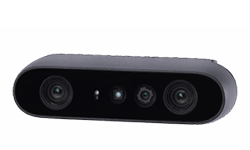
Official Orbbec original Gemini 2 illustration.
### One USB power/data path
Use the supplied data cable and a USB 3 host/powered hub that can provide **5 V/≥1.5 A**, including projector peaks. A 900 mA port or a hub shared with other cameras can enumerate yet fail under load. Start with a direct 1–1.5 m cable, confirm SuperSpeed on the host, and reduce cable complexity before investigating firmware. [Original model datasheet v1.1, setup and cable sections](https://www.orbbec.com/wp-content/uploads/2023/04/ORBBEC_Datasheet_Gemini-2-3.pdf)
Type-C is on one side and the covered 8-pin sync connector is on the other. Do not mistake the sync connector for a supply input. Keep both infrared windows, projector and RGB camera clear. Use the exact [mechanical CAD revision](https://doc.orbbec.com/documentation/Orbbec%20Gemini%20330%20Series%20Documentation/Download%20CAD%20Files%20%28Gemini%20330%20Series%29): the shared Gemini 2/Gemini 335 file has versions with and without front rubber feet. Related mechanics do not license cross-flashing firmware.
### Synchronization logic and optical datum
| Sync pin | Function in Gemini 2 model datasheet |
| -------- | ------------------------------------------------------------------ |
| 1 | VCC reference; default 1.8 V, configurable reference at 3.3 or 5 V |
| 2 | GPIO\_OUT, exposure-related output |
| 3 | VSYNC\_OUT |
| 4 | TIMER\_SYNC\_OUT |
| 5 | RESET\_IN, dedicated reset sequence |
| 6 | VSYNC\_IN |
| 7 | TIMER\_SYNC\_IN |
| 8 | Signal ground |
Use the model drawing's connector orientation and the supported hub/cable. The model v1.1 document describes a 1 ms sync pulse; do not substitute a pulse-width example from another Gemini generation. The connector's default logic is **1.8 V**, despite the 5 V USB supply. First-run capture uses no sync conductors. [Model-specific synchronization table, p.7](https://www.orbbec.com/wp-content/uploads/2023/04/ORBBEC_Datasheet_Gemini-2-3.pdf#page=7)
For geometric measurements, use device calibration and the manual's depth origin, not the case front or mounting screw as the optical center. Keep the camera rigid and preserve the camera-to-robot transform independently of depth-to-RGB alignment. Enclosure covers and nearby heat sources can change optical or thermal behavior; verify transmission and cooling before a permanent installation.
## Software and development resources
### Orbbec SDK
This procedure uses [**Orbbec SDK v2.10.6**](https://github.com/orbbec/OrbbecSDK_v2/releases/tag/v2.10.6). Its exact support table lists **Gemini 2 minimum firmware 1.4.92**, recommended **1.4.98**. It lists Gemini 2 L separately and does not support Gemini 2 XL in v2. Choose the camera's row, not the highest version in the family. [Pinned support table](https://github.com/orbbec/OrbbecSDK_v2/blob/v2.10.6/README.md#14-supported-devices)
### Host system requirements
Use a release package for the actual Windows/Linux host architecture and check the release's platform matrix. Linux needs camera device access/udev rules; Windows metadata registration is a separate setup step for complete timestamps. Do not combine a v1 library, v2 header and wrapper built against a third version.
### Wrappers for Orbbec SDK
The official [Python](https://github.com/orbbec/pyorbbecsdk), [ROS 1](https://github.com/orbbec/OrbbecSDK_ROS1/tree/v2-main), [ROS 2](https://github.com/orbbec/OrbbecSDK_ROS2/tree/v2-main), [Android](https://github.com/orbbec/OrbbecSDK-Android-Wrapper/tree/v2-main) and [Unity](https://github.com/orbbec/OrbbecUnitySDK) projects remain useful discovery paths. Verify their own device/version tables. The K4A wrapper is documented for Femto models; it is not a Gemini 2 compatibility route merely because it belongs to Orbbec.
### Modes, calibration and clocks
The camera provides Unbinned Dense Default, Unbinned Sparse Default, Binned Sparse Default and model-specific modes such as Obstacle Avoidance. Lower resolution and “sparse” are distinct processing choices. Stop streaming before switching work mode, then re-enumerate profiles. The legacy manual names Y14/RLE transport formats; use SDK-exposed decoded **Y16** for the numerical example, never cast compressed/raw transport bytes directly. [SDK G2 implementation](https://github.com/orbbec/OrbbecSDK_v2/blob/v2.10.6/src/device/gemini2/G2Device.cpp), [mode tables](https://files.seeedstudio.com/products/Orbbec/Orbbec_Gemini_2_Series_Datasheet_V1.7_20240316.pdf)
Use active-profile intrinsics for deprojection and calibrated extrinsics for depth/color/IMU transforms. Distinguish device timestamps from host arrival time; USB jitter is not a change in exposure time. Keep scale, mode, exposure and filtering with recordings. The manual's short-range module gives a single-point quantity and a special zero meaning; it cannot fill missing near-field depth across the whole image.
## Getting started
### First depth image and identity check
1. Place the original Gemini 2 on a stable mount facing a diffuse target about **1 m** away. Clear its optical windows and keep the sync cover fitted.
2. Connect a direct USB 3 data cable to a source meeting 5 V/≥1.5 A. On Linux inspect `lsusb` and `lsusb -t`; apply release udev rules if required and reconnect.
3. Install/open matching Orbbec Viewer. Confirm the exact model **Gemini 2**, serial number and firmware. Record them before changing settings or updating.
4. Select **Unbinned Dense Default** or the equivalent supported dense work mode exposed by this firmware; enumerate depth profiles and start **1280 × 800 Y16 at 30 fps**, depth alone. Confirm decoded Y16 is the selected SDK output format.
5. Inspect a stable plane and then move the target. Add RGB at an advertised mode only after depth is stable. Record frame rate, depth scale and the selected work mode.
6. Stop Viewer streams and close the device before running a separate SDK application.
**Expected result:** Viewer reports Gemini 2, displays continuous depth and produces plausible distance near the reference plane. If only raw/RLE profiles are exposed or the chosen mode does not advertise Y16, use the release's supported decode path/Viewer first and recheck the SDK/firmware pair; do not reinterpret bytes. [Original setup guide in model datasheet](https://www.orbbec.com/wp-content/uploads/2023/04/ORBBEC_Datasheet_Gemini-2-3.pdf)
### Original example: measure a central patch in millimetres
After Viewer works, close it so that one application owns the camera. This example targets **Orbbec SDK v2.10.6**, one connected camera and **Y16 depth only**. It requests an explicit profile, samples the central 10% × 10% patch, excludes invalid zero samples and reports the median every ten received frames. It deliberately does not turn one center pixel into an obstacle-clearance decision. The SDK's depth scale converts stored values to millimetres; timestamps are device microseconds. [API headers and release](https://github.com/orbbec/OrbbecSDK_v2/tree/v2.10.6/include/libobsensor/hpp)
Save this as `roi_depth.cpp`:
```cpp
#include
#include
#include
#include
#include
#include
#include
#include
#include
int main(int argc, char **argv) {
try {
if(argc != 5) {
std::cerr << "Usage: roi_depth WIDTH HEIGHT FPS usb|net\n";
return 2;
}
const int width = std::stoi(argv[1]);
const int height = std::stoi(argv[2]);
const int fps = std::stoi(argv[3]);
const bool network = std::string(argv[4]) == "net";
if(width < 10 || height < 10 || fps <= 0 ||
(!network && std::string(argv[4]) != "usb")) return 2;
ob::Context context;
context.enableNetDeviceEnumeration(network);
auto devices = context.queryDeviceList();
if(devices->getCount() != 1) {
std::cerr << "Connect exactly one supported camera on this test host.\n";
return 3;
}
auto device = devices->getDevice(0);
auto info = device->getDeviceInfo();
std::cout << info->getName() << " serial=" << info->getSerialNumber()
<< " firmware=" << info->getFirmwareVersion() << '\n';
ob::Pipeline pipeline(device);
auto profiles = pipeline.getStreamProfileList(OB_SENSOR_DEPTH);
auto profile = profiles->getVideoStreamProfile(width, height, OB_FORMAT_Y16, fps);
auto config = std::make_shared();
config->enableStream(profile);
pipeline.start(config);
int received = 0;
for(int attempt = 0; attempt < 120 && received < 60; ++attempt) {
auto frames = pipeline.waitForFrameset(1000);
if(!frames) continue;
auto depth = frames->getDepthFrame();
if(!depth || depth->getDataSize() < static_cast(width * height * 2)) continue;
++received;
const auto *bytes = static_cast(depth->getData());
std::vector valid;
const int x0 = width * 45 / 100, x1 = width * 55 / 100;
const int y0 = height * 45 / 100, y1 = height * 55 / 100;
for(int y = y0; y < y1; ++y) for(int x = x0; x < x1; ++x) {
uint16_t value;
std::memcpy(&value, bytes + 2 * (y * width + x), sizeof value);
if(value != 0) valid.push_back(value);
}
if(received % 10) continue;
std::cout << "frame=" << depth->getIndex()
<< " timestamp_us=" << depth->getTimeStampUs()
<< " valid_roi=" << valid.size() << '/' << (x1-x0)*(y1-y0);
if(valid.empty()) std::cout << " median_mm=invalid\n";
else {
auto middle = valid.begin() + valid.size()/2;
std::nth_element(valid.begin(), middle, valid.end());
std::cout << " median_mm=" << *middle * depth->getValueScale() << '\n';
}
}
pipeline.stop();
if(received < 60) { std::cerr << "Insufficient depth frames\n"; return 4; }
return 0;
} catch(const ob::Error &e) {
std::cerr << "SDK: " << e.getMessage() << '\n';
return 1;
} catch(const std::exception &e) {
std::cerr << e.what() << '\n';
return 2;
}
}
```
Use an extracted Linux v2.10.6 SDK package matching the host architecture; `SDK_ROOT` below is the **absolute directory you extracted**, containing `include` and `lib`. Save this `CMakeLists.txt` beside the source:
```cmake
cmake_minimum_required(VERSION 3.10)
project(roi_depth LANGUAGES CXX)
set(CMAKE_CXX_STANDARD 11)
find_package(OrbbecSDK REQUIRED)
add_executable(roi_depth roi_depth.cpp)
target_link_libraries(roi_depth PRIVATE ob::OrbbecSDK)
```
```bash
export SDK_ROOT=/absolute/path/to/extracted/OrbbecSDK
cmake -S . -B build -DOrbbecSDK_DIR="$SDK_ROOT/lib"
cmake --build build --config Release
# Keep the SDK extensions alongside the executable when supplied in the package.
cp -R "$SDK_ROOT/lib/extensions" build/
LD_LIBRARY_PATH="$SDK_ROOT/lib${LD_LIBRARY_PATH:+:$LD_LIBRARY_PATH}" ./build/roi_depth 1280 800 30 usb
```
The package layout and imported CMake target follow the [v2.10.6 development guide](https://github.com/orbbec/OrbbecSDK_v2/blob/v2.10.6/docs/tutorial/installation_and_development_guide.md). If an archive places its CMake config elsewhere, point `OrbbecSDK_DIR` at the directory actually containing that config. Do not mix headers and libraries from different SDK releases.
**Expected result:** the process prints six measurement records and exits successfully after receiving 60 depth frames. Each record includes a frame index, `timestamp_us`, valid sample count and `median_mm`; a diffuse target at about 1 m should give a plausible distance near its measured plane position. Those are expected results, not recorded measurements. An unsupported-profile error means enumerate/select a profile the device actually advertises; do not substitute a color format or interpret compressed depth bytes as Y16. Return code 3 means camera selection was ambiguous; 4 means too few frames arrived. A full invalid patch is reported explicitly rather than treated as zero metres.
## Troubleshooting and FAQs
| Symptom | Ordered checks |
| -------------------------------------- | ------------------------------------------------------------------------------------------------------------------------------------ |
| Device not found | Check data cable, enumeration, port power, release udev rules and other applications; reconnect only after closing streams |
| Depth starts then drops | Check projector peak power and shared USB hub/controller; test depth alone with a short known-good cable |
| Requested 60 fps unavailable | Check Binned Sparse Default and its supported resolution; 1280 × 800 full-resolution depth is not a 60 fps profile |
| RGB edges differ from depth on motion | Use calibrated alignment, correct profiles and unmodified orientation; rolling RGB exposure remains different from global-shutter IR |
| SDK v2 does not recognize old firmware | Read the exact camera firmware and support table first; use the model-specific supported upgrade path, not a 335/2 L/XL image |
| Near object produces invalid depth | Start in the ideal range; distinguish profile minimum-Z from the separate single-point ranging function |
| Timestamp jumps or fusion drift | Compare device/host domains and sequence numbers; keep work-mode and exposure changes out of the capture loop |
**Does the short-range module eliminate the stereo blind region?** No. A single-point range is not a dense depth image. Its special zero value must not be passed through as a valid 3D surface measurement.
**Can I flash Gemini 335 firmware because the CAD file is shared?** No. Use the exact model's release and SDK matrix. Shared mounting geometry does not establish firmware equivalence.
## Downloads and technical documents
| Resource | Scope |
| --------------------------------------------------------------------------------------------------------------------------------------------------------------------------------------------------------------------- | ----------------------------------------------------------------------------------------- |
| [Original Gemini 2 datasheet v1.1 PDF](https://www.orbbec.com/wp-content/uploads/2023/04/ORBBEC_Datasheet_Gemini-2-3.pdf) | Model overview, modes, setup, mechanical drawing and synchronization |
| [Gemini 2 series detailed datasheet V1.7 PDF](https://files.seeedstudio.com/products/Orbbec/Orbbec_Gemini_2_Series_Datasheet_V1.7_20240316.pdf) | Orbbec-authored, Seeed-hosted detailed source; use Gemini 2 rather than Gemini 2 L column |
| [CAD V1.0](https://orbbec-debian-repos-aws.s3.amazonaws.com/product/Gemini2%26Gemini335_CAD_Files_V1.0.zip) / [V2.0](https://orbbec-debian-repos-aws.s3.amazonaws.com/product/Gemini2%26Gemini335_CAD_Files_V2.0.zip) | With/without front rubber feet; confirm physical revision |
| [SDK v2.10.6 release](https://github.com/orbbec/OrbbecSDK_v2/releases/tag/v2.10.6) | Viewer, binaries, examples and exact support matrix |
| [Official firmware repository](https://github.com/orbbec/OrbbecFirmware) | Locate the exact Gemini 2 release; verify model and version before flashing |
| [SDK migration notes](https://github.com/orbbec/OrbbecSDK_v2/blob/v2.10.6/docs/tutorial/orbbecsdkv1_to_openorbbecsdkv2.md) | API changes for existing v1 projects |
The existing attached resource is retained here as a legacy download. Its type/version should be checked when opening it; it is not used to override the named sources above.
{% file src="/files/ex2hw2wib8fqNvrgMN9J" %}
### Extended official documentation
These official readers retain the detailed model/concept/sample paths. Use the model and release boundaries above before adapting an advanced example.
| Official reader | Relevant guide section |
| ------------------------------------------------------------------------------------------------------------------------------------------------------------------------------------------------------------------------------------------------ | ---------------------------------- |
| [Orbbec GMSL Cameras Supported Hosts and System Requirements](https://doc.orbbec.com/documentation/GMSL%20Camera%20Platform%20Compatibility%20&%20Multi-Camera%20Sync/Orbbec%20GMSL%20Cameras%20Supported%20Hosts%20and%20System%20Requirements) | Software and development resources |
| [Set up Cameras for External Synchronization](https://doc.orbbec.com/documentation/Camera%20Accessories/Set%20up%20Cameras%20for%20External%20Synchronization) | Hardware and connections |
| [Orbbec Gemini 330 Series Documentation](https://doc.orbbec.com/documentation/Orbbec%20Gemini%20330%20Series%20Documentation) | Software and development resources |
## References and validation
Source review: **24 November 2026**. Hardware specifications are explicitly versioned between the original model v1.1 document and series V1.7; code uses SDK v2.10.6 APIs. The private evidence record retains source provenance, including the Orbbec-authored PDF on Seeed's file server. No public full hardware schematic was found.
Procedures and original code were source reviewed. **SDK application execution and hardware testing were not run.** Expected output and distance checks are commissioning criteria, not measured performance. Official diagrams/downloads retain their original ownership and SDK license notices apply.
### Reviewed engineering reference chapters
The following chapters preserve the existing wiki’s detailed engineering reference: specifications, calibration and coordinate concepts, metadata, filter behavior, source examples, installation procedures, troubleshooting and manufacturer illustrations. They complement the current commissioning guide above. Revision notes beside affected chapters separate historical SDK or host examples from the model-specific power, firmware and first-result path. No historical command, example output or photograph is a claimed test on this unit.
[Original store reference](https://openelab.io/products/orbbec-gemini-2-compact-3d-stereo-vision-camera-with-imu)
### Gemini2
\
The compact Gemini 2 3D camera, released in 2023, is based on Active Stereo IR technologyand is equipped with Orbbec's latest custom ASIC for high quality depth processing, IMU andsingle cable USB 3.0 power + connectivity. The wide FOV and the wide depth sensing rangemakes Gemini 2 adaptable for many applications, especially for robotics. It is easy to set upand operate with the orbbec sDK, and delivers extremely accurate and reliable data in variouslighting conditions from pitch black to semi-outdoor.
### Applications: retained reference
Wide Field of View at 91 Horizontal and 66° Vertical\
High quality depth data output from 0.15m to 10mUp to 30 fps at 1280x800 depth resolution\
USB Type-C for power and data connectivity\
Multi-camera synchronization and IMU supported
#### Camera Specifications
| **Project** | Parameter |
| ------------------------ | ------------------------ |
| **Depth Technology** | Active Stereo IR |
| **Wavelength** | 850 nm |
| **Depth Range** | 0.15–10 m |
| **Depth Resolution/FPS** | Up to 1280×800 @ 30 fps |
| **Depth FOV** | H91° / V66° |
| **RGB Resolution/FPS** | Up to 1920×1080 @ 30 fps |
| **RGB FOV** | H86° / V55° |
| **Processing** | Orbbec ASIC |
| **IMU** | Supported |
| **Precision** | ≤ 2% @ 2 m |
#### Physical Parameters
| **Project** | Parameter |
| ------------------------- | ----------------------------------------------------------------------------------------------------- |
| **Data Connection** | USB 3.0 Type‑C |
| **Power Input** | USB 3.0 Type‑C |
| **Trigger** | Supported |
| **Power Consumption** | Earlier summary: average <2.5 W; V1.7 separates typical <2 W, maximum average <2.5 W and peak <6.5 W. |
| **Operating Environment** | 0–40°C; Indoor/Semi‑Outdoor; 5%–95% RH |
| **SDK Support** | Orbbec SDK |
| **Data Output** | Point Cloud, Depth Map, IR & RGB |
| **Dimensions** | 90 × 25 × 30 mm |
| **Weight** | 98 g |
| **Installation** | Bottom: ¼‑20 UNC;Back: 2 × M3 |
### Orbbec SDK
Orbbec SDK, designed for Orbbec® 3D cameras, is a versatile cross-platform library supporting various platforms and languages. Since version 2.0.0, we launched the Open Source Orbbec SDK (Orbbec SDK v2). The Orbbec SDK v2 supports many of our major products, with more to be added. Notably, the Gemini 335Lg and all forthcoming products released after October 2024 will be exclusively backed by the Orbbec SDK v2.
We highly recommend using the Orbbec SDK v2 for supported products. [Learn why](https://github.com/orbbec/OrbbecSDK_v2/blob/main/docs/tutorial/orbbecsdkv1_to_openorbbecsdkv2.md)
 ### System Requirements:
{% hint style="info" %}
The chapter retains its documented SDK/API generation. Older `deviceCount()`, `name()` and K4A examples are reference implementations, not a claim that they compile against Orbbec SDK v2.10.6. Use the original version-pinned first-result program above for that release. Package names, OS baselines, wrappers and firmware must be matched independently; no retained example or installer was executed in this review.
PASS and Not tested entries below are the manufacturer’s results for its listed host/OS/SDK configuration, not tests performed for this guide. Recheck the current release platform matrix before applying an older host result to a new SDK or kernel.
{% endhint %}
[Windows 10+](https://www.orbbec.com/developers/orbbec-sdk/#)[USB 3.0 / Gigabit Ethernet](https://www.orbbec.com/developers/orbbec-sdk/#)[Quad-core, 2.9GHz+](https://www.orbbec.com/developers/orbbec-sdk/#)[8GB+ RAM](https://www.orbbec.com/developers/orbbec-sdk/#)[Orbbec SDK v2 for Windows(Recommended)](https://github.com/orbbec/OrbbecSDK_v2/releases)
Supports Gemini 305g, Gemini 305, Gemini 345, Gemini 345Lg, Pulsar ME450, Pulsar SL450, Astra Mini (S) Pro, Gemini 435Le, Gemini 215, Gemini 210, Gemini 335Le, Gemini 335Lg, Gemini 335/336(L), Gemini 330(L), Gemini 2 (L), Femto Mega(I), Femto Bolt, Astra 2
[Orbbec SDK for Windows](https://github.com/orbbec/OrbbecSDK/releases)
Supports DaBai(DCW/DW), Astra Pro Plus, Gemini, Astra+, Femto (W), Astra Mini (S) Pro, Astra Embedded S, Astra Stereo S U3, Femto Mega (I), Gemini 2 (L), Gemini E, Astra 2, Gemini 2 XL, Femto Bolt, Gemini 335/336(L)
[\*Orbbec Camera Driver for Windows](https://dl.orbbec3d.com/dist/drivers/win32/astra-win32-driver-4.3.0.22.zip)
\*Only required for OpenNI and Astra SDK supported cameras
 ### System Requirements:
{% hint style="info" %}
The chapter retains its documented SDK/API generation. Older `deviceCount()`, `name()` and K4A examples are reference implementations, not a claim that they compile against Orbbec SDK v2.10.6. Use the original version-pinned first-result program above for that release. Package names, OS baselines, wrappers and firmware must be matched independently; no retained example or installer was executed in this review.
PASS and Not tested entries below are the manufacturer’s results for its listed host/OS/SDK configuration, not tests performed for this guide. Recheck the current release platform matrix before applying an older host result to a new SDK or kernel.
{% endhint %}
[Ubuntu 20.04/22.04+](https://www.orbbec.com/developers/orbbec-sdk/#)[USB 3.0 / Gigabit Ethernet](https://www.orbbec.com/developers/orbbec-sdk/#)[Quad-core, 2.9GHz+](https://www.orbbec.com/developers/orbbec-sdk/#)[8GB+ RAM](https://www.orbbec.com/developers/orbbec-sdk/#)[Orbbec SDK v2 for Linux(Recommended)](https://github.com/orbbec/OrbbecSDK_v2/releases)
Supports Gemini 305g, Gemini 305, Gemini 345, Gemini 345Lg, Pulsar ME450, Pulsar SL450, Astra Mini (S) Pro, Gemini 435Le, Gemini 215, Gemini 210, Gemini 335Le, Gemini 335Lg, Gemini 335/336(L), Gemini 330(L), Gemini 2 (L), Femto Mega(I), Femto Bolt, Astra 2
[Orbbec SDK for Linux](https://github.com/orbbec/OrbbecSDK/releases)
Supports DaBai(DCW/DW), Astra Pro Plus, Gemini, Astra+, Femto (W), Astra Mini (S) Pro, Astra Embedded S, Astra Stereo S U3, Femto Mega (I), Gemini 2 (L), Gemini E, Astra 2, Gemini 2 XL, Femto Bolt, Gemini 335/336(L)
 ### System Requirements:
{% hint style="info" %}
The chapter retains its documented SDK/API generation. Older `deviceCount()`, `name()` and K4A examples are reference implementations, not a claim that they compile against Orbbec SDK v2.10.6. Use the original version-pinned first-result program above for that release. Package names, OS baselines, wrappers and firmware must be matched independently; no retained example or installer was executed in this review.
PASS and Not tested entries below are the manufacturer’s results for its listed host/OS/SDK configuration, not tests performed for this guide. Recheck the current release platform matrix before applying an older host result to a new SDK or kernel.
{% endhint %}
[macOS 13.0+](https://www.orbbec.com/developers/orbbec-sdk/#)[USB 3.0 / Gigabit Ethernet](https://www.orbbec.com/developers/orbbec-sdk/#)[Quad-core, 2.9GHz+](https://www.orbbec.com/developers/orbbec-sdk/#)[8GB+ RAM](https://www.orbbec.com/developers/orbbec-sdk/#)[Orbbec SDK v2 for macOS(Recommended)](https://github.com/orbbec/OrbbecSDK_v2/releases)
Supports Gemini 305g, Gemini 305, Gemini 345, Gemini 345Lg, Pulsar ME450, Pulsar SL450, Astra Mini (S) Pro, Gemini 435Le, Gemini 215, Gemini 210, Gemini 335Le, Gemini 335Lg, Gemini 335/336(L), Gemini 330(L), Gemini 2 (L), Femto Mega(I), Femto Bolt, Astra 2
[Orbbec SDK for macOS](https://github.com/orbbec/OrbbecSDK/releases)
Supports Astra+, Femto (W), Astra Mini (S) Pro, Astra Embedded S, Astra Stereo S U3, Gemini 2 (L), Gemini E, Astra 2, Gemini 2 XL, Femto Mega (I), Gemini 335/336(L)
 ### System Requirements:
{% hint style="info" %}
The chapter retains its documented SDK/API generation. Older `deviceCount()`, `name()` and K4A examples are reference implementations, not a claim that they compile against Orbbec SDK v2.10.6. Use the original version-pinned first-result program above for that release. Package names, OS baselines, wrappers and firmware must be matched independently; no retained example or installer was executed in this review.
PASS and Not tested entries below are the manufacturer’s results for its listed host/OS/SDK configuration, not tests performed for this guide. Recheck the current release platform matrix before applying an older host result to a new SDK or kernel.
{% endhint %}
[Android 6.0+](https://www.orbbec.com/developers/orbbec-sdk/#)[USB 3.0](https://www.orbbec.com/developers/orbbec-sdk/#)[Quad Core 2GHz+](https://www.orbbec.com/developers/orbbec-sdk/#)[2GB+ RAM](https://www.orbbec.com/developers/orbbec-sdk/#)[Orbbec SDK v2 for Android(Recommended)](https://github.com/orbbec/OrbbecSDK-Android-Wrapper/tree/v2-main)
Supports Gemini 215, Gemini 210, Gemini 335/336(L), Gemini 330(L), Gemini 2 (L), Astra 2
[Orbbec SDK for Android](https://github.com/orbbec/OrbbecSDK-Android-Wrapper)
Supports Astra+, Femto (W), Astra Mini Pro, Astra Embedded S, Astra Stereo S U3, Gemini 2 (L), Gemini E, Astra 2, Gemini 2 XL, Gemini 335/336(L)
### Wrappers for Orbbec SDK
 [Orbbec SDK v2 for ROS(Recommended)](https://github.com/orbbec/OrbbecSDK_ROS1/tree/v2-main)
Supports Gemini 305g, Gemini 305, Gemini 345, Gemini 345Lg, Pulsar ME450, Pulsar SL450, Astra Mini (S) Pro, Gemini 215, Gemini 210, Gemini 435Le, Gemini 335Le, Gemini 335Lg, Gemini 335/336(L), Gemini 330(L), Gemini 2 (L), Femto Mega(I), Femto Bolt, Astra 2
[Orbbec SDK for ROS](https://github.com/orbbec/OrbbecSDK_ROS1/tree/main)
Supports DaBai(DCW/DW), Astra Pro Plus, Gemini, Astra+, Femto (W), Astra Mini (S) Pro, Astra Embedded S, Astra Stereo S U3, Femto Mega(I), Gemini 2 (L), Gemini E, Astra 2, Gemini 2 XL, Femto Bolt, Gemini 335/336(L), Gemini 330(L)
 [Orbbec SDK v2 for ROS2(Recommended)](https://github.com/orbbec/OrbbecSDK_ROS2/tree/v2-main)
Supports Gemini 305g, Gemini 305, Gemini 345, Gemini 345Lg, Pulsar ME450, Pulsar SL450, Astra Mini (S) Pro, Gemini 215, Gemini 210, Gemini 435Le, Gemini 335Le, Gemini 335Lg, Gemini 335/336(L), Gemini 330(L), Gemini 2 (L), Femto Mega(I), Femto Bolt, Astra 2
[Orbbec SDK for ROS2](https://github.com/orbbec/OrbbecSDK_ROS2/tree/main)
Supports DaBai(DCW/DW), Astra Pro Plus, Gemini, Astra+, Femto (W), Astra Mini (S) Pro, Astra Embedded S, Astra Stereo S U3, Femto Mega(I), Gemini 2 (L), Gemini E, Astra 2, Gemini 2 XL, Femto Bolt, Gemini 335/336(L), Gemini 330(L)
 [Orbbec SDK for Unity](https://github.com/orbbec/OrbbecUnitySDK)
Supports DaBai(DCW/DW), Gemini, Astra+, Femto (W), Astra Mini (S) Pro, Astra Embedded S, Astra Stereo S U3, Femto Mega, Gemini 2 (L), Gemini E, Astra 2, Gemini 2 XL, Femto Bolt
 [Orbbec SDK v2 for Python(Recommended)](https://github.com/orbbec/pyorbbecsdk)
Supports Gemini 305, Gemini 345, Gemini 345Lg, Pulsar ME450, Pulsar SL450, Astra Mini (S) Pro, Gemini 435Le, Gemini 215, Gemini 210, Gemini 335Le, Gemini 335Lg, Gemini 335/336(L), Gemini 330(L), Gemini 2 (L), Femto Mega(I), Femto Bolt, Astra 2
[Orbbec SDK for Python](https://github.com/orbbec/pyorbbecsdk/tree/main)
Supports DaBai(DCW/DW), Gemini, Astra+, Femto (W), Astra Mini (S) Pro, Astra Embedded S, Astra Stereo S U3, Femto Mega(I), Gemini 2 (L), Gemini E, Astra 2, Gemini 2 XL, Femto Bolt, Gemini 335/336(L), Gemini 330(L)
 [Orbbec SDK v2 for Azure Kinect Sensor SDK(Recommended)](https://github.com/orbbec/OrbbecSDK-K4A-Wrapper/tree/v2-main)
Supports Femto Mega (I), Femto Bolt
[Orbbec SDK for Azure Kinect Sensor SDK](https://github.com/orbbec/OrbbecSDK-K4A-Wrapper/tree/main)
Supports Femto Mega (I), Femto Bolt
{% file src="/files/ex2hw2wib8fqNvrgMN9J" %}