> For the complete documentation index, see [llms.txt](https://wiki.openelab.io/llms.txt). Markdown versions of documentation pages are available by appending `.md` to page URLs; this page is available as [Markdown](https://wiki.openelab.io/robotics/realsense/realsense-d400-usb-cameras-development-guide.md). Agents can also search and read this documentation through its [MCP server](https://wiki.openelab.io/~gitbook/mcp).
# RealSense D435i, D455f, D435 and D405: USB depth development
Compare exact D400 camera optics, IMUs, working distances and power, install SDK 2.59.2 and run an original per-serial depth-patch check.
{% hint style="info" %}
[**RealSense D435i on OpenELAB**](https://openelab.io/products/intel-realsense-d435i-for-unitree) · **SKU:** `Intel-D435i`
[**RealSense D455f on OpenELAB**](https://openelab.io/products/intel-realsense-d455f-depth-camera) · **SKU:** `Intel-D455F`
[**RealSense D435 on OpenELAB**](https://openelab.io/products/intel-realsense-d435-depth-camera3d) · **SKU:** `Intel-D435`
[**RealSense D405 on OpenELAB**](https://openelab.io/products/intel-realsense-d405-depth-camera) · **SKU:** `Intel-D405`
**Scope:** exact standalone USB camera variants; “f” denotes the IR-pass option, and “i” identifies the D435 variant with an IMU. A storefront handle mentioning Unitree does not establish installation compatibility with a particular robot.
{% endhint %}
D435/D435i provide 50 mm-baseline stereo depth; D455f combines a 95 mm baseline with an IR-pass filter and IMU; D405 is an 18 mm-baseline passive close-range camera. This guide compares their real connector, optical and firmware differences, then acquires depth by exact serial number with RealSense SDK 2.59.2.
## Product overview
### Product family and model boundaries
All four use onboard D4 depth processing and USB host access through librealsense. Their matching product names do not establish identical near limits, color shutters, motion streams or synchronization interfaces. The original D435 row arrived with a German-store URL; the global-store link above was independently matched by exact SKU in the catalog and observed live, rather than constructed by replacing the domain.
**D435** has global-shutter stereo depth sensors, rolling-shutter RGB and no IMU. **D435i** adds an IMU, whose physical component can vary with hardware revision. **D455f** has global-shutter depth and color, an IMU and a near-infrared-pass cover over the stereo sensors. **D405** has no projector or IMU; it derives color from a stereo imager and requires useful visible texture/light. [D400 datasheet Revision 023, §§3.8 and 4](https://www.realsenseai.com/wp-content/uploads/2026/03/RealSense-D400-Series-Datasheet-Mar-2026.pdf)
For Orbbec alternatives see the [Gemini 335 USB guide](https://wiki.openelab.io/robotics/orbbec/orbbec-gemini-335-user-manual.md) and [Gemini 305 close-range guide](https://wiki.openelab.io/robotics/orbbec/orbbec-gemini-305-user-manual.md). Their SDK APIs, firmware and trigger pinouts are different.
## Applications
| Task | Useful model distinction |
| ------------------------------------------------- | ------------------------------------------------------------------------------------------------------------ |
| General USB stereo perception | D435 if no motion stream is needed; D435i when an actual six-axis data stream is required |
| Greater-distance geometry and motion-aware RGB-D | D455f longer baseline/global RGB; evaluate the IR-pass filter's behavior in the actual illumination |
| Small objects and wrist/bench close-range capture | D405 passive visible-light stereo; use texture and a target within the selected profile's near limit |
| Multi-camera hardware timing | D435/D435i depth-only external synchronization versus D455f depth and RGB; D405 has no exposed hardware sync |
A camera's maximum range is not the distance at which every target meets its factory quality metrics. Treat missing depth as unknown, preserve timestamps and calibration, and keep robot motion disabled during initial perception/transform checks.
## Specifications
Exact-model data below uses [D400 Product Family Datasheet, document 337029-017, Revision 023, March 2026](https://www.realsenseai.com/wp-content/uploads/2026/03/RealSense-D400-Series-Datasheet-Mar-2026.pdf), especially pp.65–70, 73–85 and 104–105. “Up to 90 fps” applies to lower-resolution depth profiles, not 1280 × 720 at 90 fps.
| Parameter | D435 | D435i | D455f | D405 |
| -------------------------------------------------- | ----------------------- | ---------------------------------- | ------------------------------------------------ | --------------------------------------------- |
| Sold SKU | `Intel-D435` | `Intel-D435i` | `Intel-D455F` | `Intel-D405` |
| Stereo baseline | 50 mm | 50 mm | 95 mm | 18 mm |
| Projector / depth filter | IR projector / all-pass | IR projector / all-pass | IR projector / IR-pass | No projector / IR-cut |
| Depth / color shutter | Global / rolling | Global / rolling | Global / global | Global stereo imagers; color from left imager |
| IMU | None | Six-axis, revision dependent | Six-axis, BMI085 in listed D455f production code | None |
| Depth HD FOV | 87° × 58° | 87° × 58° | 87° × 58° | 84° × 58° at 20 cm |
| Full-resolution depth maximum | 1280 × 720, 30 fps | Same | Same | Same |
| Example high-rate depth | 848 × 480, up to 90 fps | Same | Same | Same |
| Color maximum in USB 3 format table | 1920 × 1080, 30 fps | Same | 1280 × 800, 30 fps | 1280 × 720, 30 fps |
| Color nominal FOV | 69° × 42° | Same | 90° × 65° | 84° × 58° |
| Data connector at camera | USB Type-C | USB Type-C | USB Type-C | USB 3 Micro-B, not Type-C |
| Nominal housing dimensions | 90 × 25 × 25 mm | Same D43x envelope | 124 × 29 × about 26.8 mm including filter | 42 × 42 × 23 mm |
| Published nominal family mass | 75 g | 75 g D43x table, tolerance applies | 116 g D45x table, tolerance applies | 58 g |
| Power at specified maximum operating configuration | About 3.403 W | About 3.403 W in shared D43x table | About 3.461 W | About 1.482 W |
The power numbers are **configuration-based component sums**, not independently measured peaks or required supply ratings. D43x uses 1280 × 720 depth and 1920 × 1080 color at 30 fps; D45x uses 1280 × 720 depth/color at 30 fps; D405 uses 848 × 480 depth/color at 90 fps. Keep host/hub power margin. Nominal masses have ±10% tolerance and bulk units may omit a roughly 2.3 g USB cap. [Power and mass notes](https://www.realsenseai.com/wp-content/uploads/2026/03/RealSense-D400-Series-Datasheet-Mar-2026.pdf)
The camera environmental qualification is **0–35 °C powered ambient**, with **0–50 °C rear case**, under the datasheet's stated tripod/still-air conditions. Internal component limits and storage maxima are not broader ambient operating ratings. A tight enclosure or robot heat source needs a separately evaluated thermal path. [Thermal conditions p.68](https://www.realsenseai.com/wp-content/uploads/2026/03/RealSense-D400-Series-Datasheet-Mar-2026.pdf#page=68)
### Near distance depends on resolution
| Depth profile | D435/D435i minimum-Z | D455f minimum-Z | D405 minimum-Z |
| ------------- | -------------------- | --------------- | -------------- |
| 1280 × 720 | 280 mm | 520 mm | 100 mm |
| 848 × 480 | 195 mm | 350 mm | 70 mm |
| 640 × 360 | 150 mm | 260 mm | 55 mm |
| 480 × 270 | 120 mm | 200 mm | 45 mm |
| 424 × 240 | 105 mm | 180 mm | 40 mm |
These are [Revision 023 minimum-Z table values](https://www.realsenseai.com/wp-content/uploads/2026/03/RealSense-D400-Series-Datasheet-Mar-2026.pdf#page=84), not interchangeable with the product page's ideal range. In particular, “D405 works at 7 cm” describes a specific profile; the full 1280 × 720 profile has a 100 mm near limit.
The factory quality table specifies ±2% Z accuracy for D43x through 2 m, D455-class through 4 m and D405 through 0.5 m, at HD resolution and central 80% ROI under the stated tests. D405 testing uses a textured target and about 250 lux; active models use a textureless white target with default projector settings. These different tests must stay with any accuracy comparison. [Quality tables pp.84–86](https://www.realsenseai.com/wp-content/uploads/2026/03/RealSense-D400-Series-Datasheet-Mar-2026.pdf#page=84)
## Hardware and connections
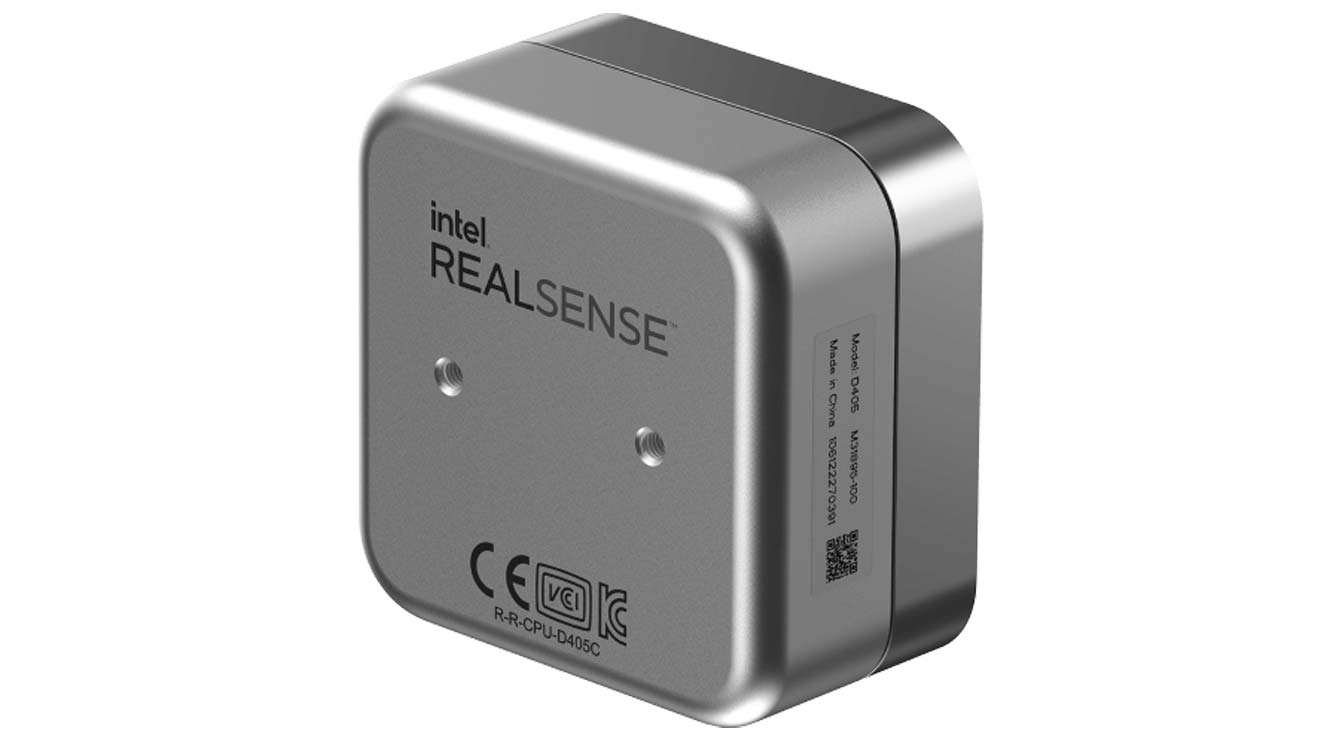
Official RealSense D405 product illustration. This close-range model uses Micro-B; the other three listed models use Type-C.
### USB power and connector orientation
Use the camera's supplied certified USB data cable, first connecting it to the camera and then to a direct USB 3 host port. D435, D435i and D455f use **Type-C** at the camera; D405 uses the wider **USB 3 Micro-B** connector with separate SuperSpeed contacts. A USB 2 Micro-B cable is not equivalent for the requested USB 3 profiles. Never force a Type-C lead into D405 or feed a robot's 12/24 V rail into any of these USB connectors.
The D4-board electrical table specifies USB VBUS **4.75–5.25 V nominal 5 V**, and a board supply-current entry of **700 mA**. That is the document's D4-board scope, while the assembled-camera configuration powers are listed above. Use a fully powered USB 3 host/hub and avoid an unqualified splitter or charge-only lead; do not design a camera power injector from the bare-processor rail tables. [USB and board electrical sections, pp.60–64](https://www.realsenseai.com/wp-content/uploads/2026/03/RealSense-D400-Series-Datasheet-Mar-2026.pdf#page=60)
### Mounting and depth datum
Select the actual model/revision mechanical drawing before choosing screw length or bracket clearance. The longer D455f housing includes an added filter thickness; it is not exactly the unfiltered D455's depth. A rigid thermally conductive bracket and an unobstructed optical face improve stability. Do not stress the housing or cover its thermal path. The “f” filter is an optical option, **not an IP65 enclosure**; the separately named D456 has that enclosure distinction.
| Camera | Depth origin behind front cover glass |
| ------------ | ------------------------------------- |
| D435 / D435i | 4.2 mm |
| D455f | 5.05 mm |
| D405 | 3.7 mm |
When measuring from the front glass to a target, add this magnitude to obtain the reference distance from the depth origin according to [Table 4-17, p.89](https://www.realsenseai.com/wp-content/uploads/2026/03/RealSense-D400-Series-Datasheet-Mar-2026.pdf#page=89). The optical XY origin is the left imager, not the center of the entire case.
### Synchronization: D405 is different
The exposed sync connector for the applicable D435/D435i/D455-class cameras is a **9-position JST shrouded header**, part **SM09B-SRSS-TB(LF)(SN)**. The relevant functional pins are:
| Pin | Function | Scope |
| --- | ---------------------- | ------------------------------------------------------ |
| 5 | Z\_VSYNC / depth VSYNC | Hardware timing signal |
| 8 | VDD33V | 3.3 V pin; not a general camera power-input substitute |
| 9 | GND | Signal reference |
The remaining pins have projector/control roles and must not be treated as spare GPIO. Use the exact [connector drawing p.60](https://www.realsenseai.com/wp-content/uploads/2026/03/RealSense-D400-Series-Datasheet-Mar-2026.pdf#page=60) and [physical camera connector location pp.114–115](https://www.realsenseai.com/wp-content/uploads/2026/03/RealSense-D400-Series-Datasheet-Mar-2026.pdf#page=114). D435/D435i synchronize depth externally; their rolling RGB sensor does not acquire the same external sync capability. D455f supports depth and RGB synchronization. **D405 does not expose/support that hardware-sync path.**
For a custom trigger use the manufacturer's [multi-camera electrical/timing guide](https://dev.realsenseai.com/docs/multiple-depth-cameras-configuration/), including signal levels, pulse and grounding requirements for the exact generation. First-result capture below requires no trigger wiring. Sharing a USB hub or calling host timestamps “synchronized” is not hardware synchronization.
## Software and development resources
### Technical documents and development software
Use [**librealsense/RealSense SDK v2.59.2**](https://github.com/realsenseai/librealsense/releases/tag/v2.59.2), released 15 November 2026, for this procedure. The release's actual support matrix distinguishes these firmware baselines:
| Exact USB camera | SDK 2.59.2 firmware baseline |
| ---------------------------- | ---------------------------- |
| D435 / D435i / D455f | **5.17.3.10 or later** |
| D405, under “Other D400 USB” | **5.17.0.10 or later** |
The [official firmware table](https://dev.realsenseai.com/docs/firmware-releases-d400/) explicitly lists D405 in the 5.17.0.10 row but not in the newer 5.17.3.10 row. Do not select the newest row without checking its supported-SKU list. Read identity/firmware first; do not make flashing the first connection test.
Windows users can use the release's [2.59.2.11152 installer](https://github.com/realsenseai/librealsense/releases/download/v2.59.2/RealSense.SDK-WIN10-2.59.2.11152.exe) and [Viewer executable](https://github.com/realsenseai/librealsense/releases/download/v2.59.2/RealSense.Viewer.exe). Linux users should follow the [pinned distribution instructions](https://github.com/realsenseai/librealsense/blob/v2.59.2/doc/distribution_linux.md) for supported Ubuntu/kernel combinations. Check `uname -r` before selecting DKMS versus a supported userspace/source route; a general Linux or Jetson name does not establish the correct kernel package.
### Calibration, coordinates and depth processing
Z16 stores depth counts; query the sensor's metres-per-count scale rather than assuming 1 count = 1 mm. `depth.get_distance(x, y)` and the scale-aware example below avoid that assumption. Deprojection uses the active profile's intrinsics; transformations to RGB require calibrated extrinsics/distortion. The optical coordinate convention is X right, Y down and Z forward. Alignment crops/occludes data according to the target camera FOV; a smaller RGB FOV does not invent missing scene coverage. [SDK projection reference](https://github.com/realsenseai/librealsense/wiki/Projection-in-RealSense-SDK-2.0)
The SDK provides decimation, spatial, temporal, disparity and hole-filling processing. For meaningful comparisons keep raw data and the filter settings. Stereo spatial filtering is often applied in disparity space; temporal filtering retains history and can be inappropriate for fast-moving objects. A filled pixel is estimated, not an additional physical observation. [Official post-processing guide](https://dev.realsenseai.com/docs/depth-post-processing/)
Inspect factory calibration and a known target before running self-calibration or tare. Save existing calibration and a baseline measurement first; recalibration writes are not needed to show the first valid depth stream. IR-pass D455f can need additional IR illumination for some calibration tasks. [Calibration and filter context, datasheet §§3.8 and 4](https://www.realsenseai.com/wp-content/uploads/2026/03/RealSense-D400-Series-Datasheet-Mar-2026.pdf), [self-calibration guide](https://dev.realsenseai.com/docs/self-calibration-for-depth-cameras/)
### IMU and timestamp handling
D435i may contain BMI055 or BMI085 depending on product revision. The manual lists accelerometer rates **62.5/250 Hz** for BMI055 versus **100/200 Hz** for BMI085, while both list gyro **200/400 Hz**; enumerate the actual sensor profiles. D455f's listed production material code uses BMI085. Do not force the older IMU rates just because a tutorial used them. D435/D405 have no IMU.
Preserve frame number, device/host timestamp domain, exposure and sensor identity with captured data. A timestamp value alone is insufficient for multi-camera or IMU fusion. After the depth-only check, enable supported gyro/accelerometer profiles and establish the frame transform and clock relationship before integrating a robot estimator. [IMU revision and rate tables pp.69–70, 94–95](https://www.realsenseai.com/wp-content/uploads/2026/03/RealSense-D400-Series-Datasheet-Mar-2026.pdf)
## Getting started
### Getting started: depth first, application second
1. Read the model/SKU and prepare its correct data cable. Use a textured target **15–20 cm** away for D405, or a diffuse target around **1 m** away for the other three. Keep robot motion and custom sync wiring disconnected.
2. Connect directly to a USB 3 host. Inspect USB enumeration and link speed (`lsusb` and `lsusb -t` on Linux). Resolve cable, power and device-access issues before editing firmware or calibration.
3. Install SDK/Viewer 2.59.2 for the supported host. Open the camera, record model, serial, firmware and USB connection type, then compare the camera against the firmware table above. If below the support baseline, follow its exact-model update instructions before continuing with this versioned procedure.
4. In Viewer, start **depth only**, **848 × 480 Z16 at 30 fps**. This profile is listed for all four cameras over USB 3. Start with normal factory settings; do not turn on every filter or recalibrate as part of the first test.
5. Confirm coherent depth on the target and inspect frame timing. For D405, improve visible texture/light if the patch is invalid. For D455f, inspect IR exposure and illumination rather than treating visible brightness as proof of sufficient IR texture.
6. Stop Viewer streaming and close its device before running the serial-selected example below. Retain a short baseline clip and settings/firmware record.
**Expected result:** the selected camera reports its actual serial/model and produces continuous depth at the listed profile. Valid target pixels give a plausible distance; invalid zeros remain unknown. Seeing a color image alone does not prove a depth stream or a correct depth scale.
### Original Python example: select the exact camera and measure a patch
Use a supported desktop x64 Python environment with the official `pyrealsense2` wheel. The exact v2.59.2 Python README documents supported interpreters and architecture/JetPack constraints. An x64 wheel is not an ARM64 wheel, and Jetson wheels are tied to a JetPack/Python combination. [Python wrapper instructions](https://github.com/realsenseai/librealsense/blob/v2.59.2/wrappers/python/readme.md)
```bash
python3 -m venv .venv
. .venv/bin/activate
python -m pip install 'pyrealsense2>=2.59.2,<2.59.3' numpy
python -m pip show pyrealsense2
```
Save the following original program as `realsense_patch.py`. It lists devices without starting streams, requires an exact serial/model match, rejects firmware below the release baseline, discards 30 settling frames and reports a median from the central 10% × 10% patch. Metric conversion comes from the device. It does not enable motion, write calibration, change projector power or flash firmware.
```python
import argparse
import re
import sys
import numpy as np
import pyrealsense2 as rs
MODELS = {"D435": "5.17.3.10", "D435i": "5.17.3.10",
"D455f": "5.17.3.10", "D405": "5.17.0.10"}
def version_tuple(text):
return tuple(int(x) for x in re.findall(r"\d+", text)[:4])
def main():
parser = argparse.ArgumentParser()
parser.add_argument("--list", action="store_true")
parser.add_argument("--serial")
parser.add_argument("--model", choices=MODELS)
args = parser.parse_args()
context = rs.context()
devices = list(context.query_devices())
for device in devices:
print(device.get_info(rs.camera_info.name),
"serial=" + device.get_info(rs.camera_info.serial_number),
"firmware=" + device.get_info(rs.camera_info.firmware_version))
if args.list:
return 0
if not args.serial or not args.model:
parser.error("Use --list first, then --serial and --model")
selected = [d for d in devices
if d.get_info(rs.camera_info.serial_number) == args.serial]
if len(selected) != 1:
raise RuntimeError("The requested serial is not uniquely connected")
device = selected[0]
name = device.get_info(rs.camera_info.name)
if args.model.upper() not in name.upper().split():
raise RuntimeError("Requested model does not match the selected device: " + name)
firmware = device.get_info(rs.camera_info.firmware_version)
if version_tuple(firmware) < version_tuple(MODELS[args.model]):
raise RuntimeError("Firmware below SDK 2.59.2 support baseline; review the exact-model update path first")
pipeline = rs.pipeline(context)
config = rs.config()
config.enable_device(args.serial)
config.enable_stream(rs.stream.depth, 848, 480, rs.format.z16, 30)
profile = pipeline.start(config)
try:
scale_m = profile.get_device().first_depth_sensor().get_depth_scale()
for number in range(1, 91):
frames = pipeline.wait_for_frames(2000)
depth = frames.get_depth_frame()
if not depth:
raise RuntimeError("Frameset has no depth frame")
if number <= 30:
continue
data = np.asanyarray(depth.get_data())
height, width = data.shape
patch = data[height * 45 // 100:height * 55 // 100,
width * 45 // 100:width * 55 // 100]
valid = patch[patch != 0]
if number % 10 == 0:
median = float(np.median(valid)) * scale_m if valid.size else None
print("frame=", depth.get_frame_number(),
"timestamp_ms=", depth.get_timestamp(),
"domain=", depth.get_frame_timestamp_domain(),
"valid_roi=", str(valid.size) + "/" + str(patch.size),
"median_m=", median)
finally:
pipeline.stop()
return 0
if __name__ == "__main__":
try:
sys.exit(main())
except RuntimeError as error:
print("Capture stopped:", error, file=sys.stderr)
sys.exit(1)
```
```bash
python realsense_patch.py --list
# Replace the serial argument with the exact value printed by --list.
python realsense_patch.py --serial YOUR_CAMERA_SERIAL --model D435i
```
For the other variants choose `--model D435`, `--model D455f` or `--model D405`, with that device's serial. The model argument is intentionally checked against the device name; it is not permission to reuse another camera's configuration.
**Expected result:** enumeration prints model, serial and firmware. Capture prints six records after settling, each with frame number, `timestamp_ms`, timestamp domain, valid count and `median_m`, then stops cleanly. At the proposed target distances the median should be plausible and reasonably stable; no exact accuracy is asserted. `median_m=None` means no valid samples in the patch. A profile, firmware or timeout error stops capture and points back to the matching prerequisite. These are expected outcomes; no camera execution is claimed.
### Application integration
After the baseline, add color at a supported profile and use `rs.align` or the calibrated projection APIs as appropriate. Then add IMU only on D435i/D455f. Record data using the SDK's record/playback interfaces and verify that calibration, frame numbers and timing survive playback. For ROS or another framework, pin its matching librealsense version and the exact serial/stream configuration before performance tuning.
## Troubleshooting and FAQs
| Symptom | Ordered checks and bounded recovery |
| ----------------------------------- | ---------------------------------------------------------------------------------------------------------------------------------------------------------------- |
| Camera absent | Cable/data contacts, direct USB 3 port, udev/device permissions and other application ownership; D405 needs its USB 3 Micro-B cable |
| USB 2 connection or profile error | Check negotiated speed and full connector seating; the USB 2 tables have different rate combinations. Do not force a USB 3 profile onto USB 2 |
| Camera disconnects under load | Remove weak hubs/extensions, inspect shared power/controller bandwidth, test depth alone, then add one stream at a time |
| D405 lacks depth on a plain surface | Add visible texture and room light; there is no onboard IR projector to enable |
| D455f behaves worse in some scenes | Compare IR exposure/illumination and surface reflections. The filter suppresses visible light and can limit passive indoor texture/range |
| Object vanishes near camera | Compare the selected resolution against minimum-Z, not only the advertised ideal range |
| D435i motion profile unavailable | Check hardware IMU revision and enumerated sample rates; BMI055 and BMI085 accelerometer rates differ |
| Depth/RGB or robot transform wrong | Check active-profile calibration, distortion/units, alignment target and optical datum. A case-center transform is not automatically the depth optical transform |
| Filtered depth shows ghosts | Disable temporal/history and hole-filling effects; compare raw frames and timestamps before changing geometry |
| Device appears in recovery mode | Use the official firmware utility/Viewer and exact supported image. Preserve serial/version logs; avoid repeated downgrade cycles or shorting internal pins |
**Is D455f just D455 with weather sealing?** No. Its “f” identifies the IR-pass optical filter; the separately named D456 is the IP65 enclosure variant. The filter changes available optical texture and calibration conditions.
**Can all four cameras share one sync cable?** No. D405 has no hardware sync interface, and the others' depth/RGB external-sync capabilities differ. Use the model-specific electrical guide.
**Should I recalibrate first when a depth patch is blank?** No. Check range, texture/light, exposure, USB stability and invalid pixels first. Calibration writes cannot supply missing stereo texture.
**Does the D435i store handle guarantee a Unitree mounting/firmware package?** No. This guide covers the standalone camera SKU; verify robot mechanics, compute image and software separately.
## Downloads and technical documents
| Resource | Role and version |
| ------------------------------------------------------------------------------------------------------------------------------------------------------------------------------------------------------------------------------------ | ----------------------------------------------------------------------------------------------------- |
| [D400 family datasheet Revision 023 PDF](https://www.realsenseai.com/wp-content/uploads/2026/03/RealSense-D400-Series-Datasheet-Mar-2026.pdf) | Full camera/module distinctions, power, stream formats, optics, thermal, sync and mechanical diagrams |
| [Current product datasheets](https://www.realsenseai.com/product-datasheets/) | Check later revisions and model-specific documentation |
| [Direct D400 camera CAD ZIP](https://dev.realsenseai.com/download/41950) / [Official CAD files](https://dev.realsenseai.com/docs/cad-files/) | Exact camera 2D/3D models; do not use a D430 bare module drawing as a D435 enclosure drawing |
| [SDK v2.59.2 release](https://github.com/realsenseai/librealsense/releases/tag/v2.59.2) | Supported cameras, firmware baselines, installers and tools |
| [Windows SDK installer 2.59.2.11152](https://github.com/realsenseai/librealsense/releases/download/v2.59.2/RealSense.SDK-WIN10-2.59.2.11152.exe) | Full Windows release package |
| [Viewer executable](https://github.com/realsenseai/librealsense/releases/download/v2.59.2/RealSense.Viewer.exe) / [Depth Quality Tool](https://github.com/realsenseai/librealsense/releases/download/v2.59.2/Depth.Quality.Tool.exe) | Visual commissioning and controlled plane-quality evaluation |
| [Firmware table](https://dev.realsenseai.com/docs/firmware-releases-d400/) / [firmware utility guide](https://dev.realsenseai.com/docs/firmware-update-tool/) | Match exact SKU/version; read support/errata before an update |
| [Pinned Python examples](https://github.com/realsenseai/librealsense/tree/v2.59.2/wrappers/python/examples) / [C++ examples](https://github.com/realsenseai/librealsense/tree/v2.59.2/examples) | SDK acquisition, alignment, point cloud and recording/playback examples |
| [Multi-camera guide](https://dev.realsenseai.com/docs/multiple-depth-cameras-configuration/) | Electrical and timing design for supported hardware sync |
| [Manufacturer comparison](https://www.realsenseai.com/compare-depth-cameras/) | Model-selection context; detailed datasheet limits take precedence for integration |
## References and validation
Reviewed **24 November 2026** against datasheet Revision 023 (March 2026), SDK **v2.59.2**, its Python bindings and actual release firmware matrix. The official CAD/resource pages and useful existing source links remain reachable above. Raw-processor PCB design, motherboard power rails and bare depth-module interfaces are distinct scopes from these packaged USB cameras and are not commissioning instructions here.
The original Python program passed a syntax parse without importing the SDK. **SDK execution, hardware tests, firmware updates and calibration writes were not run.** Factory metrics and expected results are attributed conditions, not measurements from this guide. librealsense source is Apache-2.0 licensed; manufacturer PDFs, CAD and bundled firmware retain their own terms.
### Reviewed engineering reference chapters
The following chapters preserve the existing wiki’s detailed engineering reference: specifications, calibration and coordinate concepts, metadata, filter behavior, source examples, installation procedures, troubleshooting and manufacturer illustrations. They complement the current commissioning guide above. Revision notes beside affected chapters separate historical SDK or host examples from the model-specific power, firmware and first-result path. No historical command, example output or photograph is a claimed test on this unit.
### Product family and model boundaries
This guide covers **D435, D435i, D455f and D405 USB depth cameras**. They share a software ecosystem, but differ in optics, useful distance, motion sensing and filtering. Select the camera according to the working distance and scene, not merely the shared D400 name.
| Model | Distinguishing scope |
| ----- | ---------------------------------------------------------------- |
| D435 | Wide-field stereo-depth camera; no integrated IMU |
| D435i | D435-family depth with integrated IMU |
| D455f | Longer-baseline D455-family camera with IR-pass filter and IMU |
| D405 | Close-range stereo camera for near-field inspection/manipulation |
The manufacturer datasheet documents depth/RGB stream modes, FOV, operating limits and model-specific geometry. D435-family depth supports up to **1280 × 720** and up to **90 FPS**, but available combinations vary by mode. Treat those maxima separately; do not assume every resolution supports every frame rate.
### Technical documents and development software
Use the current **D400 datasheet** and mechanical drawings for your exact camera when designing brackets or assessing minimum distance. D435i's IMU and D455f's filter are not features of the plain D435. An IR-pass filter can help in some illumination conditions; it does not eliminate all depth failures on reflective or transparent surfaces.
The official **librealsense SDK** provides RealSense Viewer, C/C++ APIs, examples and Python bindings. Select a release whose compatibility table covers the camera, firmware and host OS. Keep those versions together rather than updating firmware independently of the application.
### Getting started: depth first, application second
1. Install the SDK for the host OS using its supported installation path.
2. Connect one camera directly to a suitable USB 3 host port with a known-good data cable. Avoid an unpowered hub for the first test.
3. Open **RealSense Viewer**, verify model/serial/firmware, and enable a supported depth stream.
4. Place a textured, matte target inside the selected model's documented working range. Confirm a stable depth image.
5. Enable RGB if applicable; on D435i/D455f separately verify motion streams. Save a short recording and its stream configuration.
**Checkpoint:** repeatable streaming with an identified USB mode and the expected streams. Viewer success does not yet establish calibrated hand-eye transforms, time synchronization or robot perception accuracy.
### Application integration
Start from an SDK example matching the programming language. Query device capabilities rather than hard-coding another model's streams. For robotics, define the optical coordinate frame, depth units, camera intrinsics and any color/depth alignment deliberately. Preserve original calibration metadata with recordings.
### FAQs
**Camera appears only as USB 2?** Check cable, port and hubs; reduce the stream configuration while diagnosing bandwidth.
**Depth is missing near an object?** Compare distance against the exact model's minimum range; D405 serves a different near-field role from D455f.
**IMU not found on D435?** Use a model that actually contains an IMU.
**Depth/color are shifted?** Apply the SDK's calibrated alignment correctly; raw streams come from different viewpoints.
**Recovery?** Follow the SDK's supported firmware update/recovery flow and compatibility table. Save application configuration and recordings before changes.
### Sources and validation
* [Manufacturer model comparison](https://www.realsenseai.com/compare-depth-cameras/)
* [D400-family datasheet, March 2026](https://www.realsenseai.com/wp-content/uploads/2026/03/RealSense-D400-Series-Datasheet-Mar-2026.pdf)
* [Official SDK and examples](https://github.com/realsenseai/librealsense)
* [SDK releases and firmware compatibility](https://github.com/realsenseai/librealsense/releases)
* [Manufacturer datasheet and drawing downloads](https://www.realsenseai.com/product-datasheets/)
Reviewed 18 November 2026. Source links and accessible manufacturer documentation were reviewed; this guide has not been compiled or tested on physical hardware. Before reproducing a project, record the board revision, firmware/SDK release or commit, operating system and any changes to the supplied configuration.